The functionality was originally implemented in Task #26014.
Definitions
See also
FHIR terminology module
- Binding
Element’s binding links a data element to a specific Value Set. The binding can also specify strength:
- Cardinality
Minimum and maximum number of times the element (i.e property) can appear in the instance (i.e. resource).
- Code System
A Code System is a master catalogue of a particular set of codes and their meanings. A code system consists of concepts. For more information about Code Systems, refer to the FHIR documentation: https://www.hl7.org/fhir/terminologies.html
- Code System Concept
An individual item, or value from Code System
- Differential
Lists element definition components that are modified or added to the Profile compared to its base resource or parent profile. It does not repeat unchanged elements. To get full picture (snapshot), the differential items are added to the base resource’s structure.
- EHR
Electronic Health Record
- Element type
type of an element, defines its structure. This could be a primitive (string, boolean, date), or a complex data type (Codeable concept,
HumanName, etc), or a reference to another FHIR resource (Patient).- Extension
Extensions in FHIR allow you to create additional elements that do not exist in the base resource definition. A profile specifies which extensions are used by a system for a specific resource. If an extension relates to a terminology, it will usually specify a Value Set to use. For more information about extensions, refer to the FHIR documentation: https://www.hl7.org/fhir/extensibility.html
- FHIR
Fast Healthcare Interoperability Resources (FHIR®) is a draft standard from Health Level 7 International (HL7) designed to allow the exchange of electronic health records. It is built upon previous standards such as HL7 version 2 and HL7 version 3, and uses XML and JSON for data representation.
See also
- LFPSE
Learn from patient safety events
- LRMS
Local Risk Management System
- ODS
- Organisation code
An ODS code (also called an Organisation code) is a unique code created by the Organisation Data Service within NHS Digital, and used to identify organisations across health and social care. ODS codes are required in order to gain access to national systems like NHSmail and the Data Security and Protection Toolkit.
- OIR
Online Incident Recording
- Profile
The base FHIR specification creates a common foundation on which various different solutions are implemented. In order to document the specific requirements for a given system, a profile is created which specifies:
Rules about which resource elements are used or not used
What elements may be included that aren’t part of the base resource (extensions)
Rules about which terminologies are used for particular elements
For example, the “LFPSE Adverse Event” profile will specify that an Adverse Event may include a “Never” Event type (an extension), and values for this field must come from a specific Value Set.
See also
For more information about profiles, refer to the FHIR documentation: https://www.hl7.org/fhir/profiling.html
- Property
A field in a resource. Can contain a value of one of the supported data types.
- Resource
From a clinical perspective, the most important parts of the FHIR specification to understand are the Resources. Think of Resources as paper “forms” reflecting different types of clinical and administrative information that can be captured and shared. The FHIR specification defines a generic “form template” for each type of clinical information - so one for allergies, one for prescriptions, one for referrals, etc.
FHIR data consists of repositories containing completed “forms” (resource instances). The resource instances describe patient-related information (such as demographics, health conditions and procedures) as well as administrative information (such as practitioners, organizations and locations). Some resources are infrastructure components used to support the technical exchange of information by describing what systems are able to do, defining allowed sets of codes, etc. FHIR repositories might be electronic health record (EHR) systems, pharmacy systems, hospital information systems (HIS), etc. Some systems, such as clinical decision support engines, may expose FHIR interfaces even though they don’t actually store any patient or administrative information themselves.
Each Resource defines a small amount of highly-focused data. A single resource doesn’t say very much, but a collection of Resources taken together creates a useful clinical record. Information systems map the actions that a user takes (look up patient records, make a note in their history, etc.) to operations on the relevant resources.
See also
- Snapshot
defines Profile structure as a self-contained list of all element definitions, including those inherited from the base resource.
- Submit Endpoint
The API endpoint which is used to create, read and update LFPSE submissions.
- Taxonomy
The LFPSE data model (schema), or “Taxonomy”, comprises a set of FHIR resources which define all possible properties, or question responses, that are accepted in LFPSE.
- Taxonomy Endpoint
The API endpoint used to read the taxonomy of LFPSE forms.
- Value Set
Value Sets select a set of codes from one or more code systems to specify which codes can be used in a particular context. For more information about Value Sets, refer to the FHIR documentation: https://www.hl7.org/fhir/terminologies.html
Model diagram
Open the diagram in a new tab or window to expand
![@startuml
skinparam rectangle {
backgroundColor<<FHIR_Resource>> LightBlue
backgroundColor<<FHIR_Conformance>> LightGreen
backgroundColor<<FHIR_Primitive>> LightYellow
backgroundColor<<FHIR_ComplexType>> LightSalmon
backgroundColor<<FHIR_ElementDef_Component>> LightSteelBlue
backgroundColor<<LFPSE_Concept>> Technology
}
hide empty members
package "LFPSE Data Structure (FHIR-based)" {
package "FHIR Conformance Resources" <<FHIR_Conformance>> {
class Profile <<FHIR_Conformance>> {
**Profile (StructureDefinition)**
--
Defines constraints and extensions
on a base Resource for LFPSE.
Specifies how LFPSE uses Resources.
----
*LFPSE Context:*
LFPSE AdverseEvent Profile,
LFPSE Practitioner Profile, etc.
(Defined in "NHSE LPFSE Taxonomy
Resource Definition")
}
class CodeSystem <<FHIR_Conformance>> {
**CodeSystem**
--
A set of codes with meanings.
A dictionary of terms.
----
*LFPSE Context:*
Defines valid codes for fields like
Event Type, Incident Location, Gender Identity.
(Represented by Code List CSVs)
}
class ValueSet <<FHIR_Conformance>> {
**ValueSet**
(Implied, essential for Binding)
--
A curated collection of codes
from one or more CodeSystems,
for use in a specific element.
----
*LFPSE Context:*
LFPSE-specific ValueSets group codes
from LFPSE CodeSystems for binding
to Profile elements.
}
}
package "StructureDefinition Components" <<FHIR_ElementDef_Component>> {
class ElementDefinition <<FHIR_ElementDef_Component>> {
**ElementDefinition**
(Underpins Snapshot/Differential Elements)
--
Describes a single data element
within a Profile or Extension.
}
ElementDefinition <|-- SnapshotElement
class SnapshotElement <<FHIR_ElementDef_Component>> {
**SnapshotElement**
(Part of Profile.snapshot)
--
Full list of all elements in a
Profile, including inherited and
modified elements.
Each is an ElementDefinition.
----
*LFPSE Context:*
Defines every field in an LFPSE
record (e.g., in the LFPSE
AdverseEvent Profile snapshot).
}
ElementDefinition <|-- DifferentialElement
class DifferentialElement <<FHIR_ElementDef_Component>> {
**DifferentialElement**
(Part of Profile.differential)
--
List of elements changed or added
by a Profile relative to its base.
Each is an ElementDefinition.
----
*LFPSE Context:*
Shows LFPSE-specific modifications
to base FHIR resources.
}
ElementDefinition o-- ElementType
class ElementType <<FHIR_ElementDef_Component>> {
**ElementType**
(ElementDefinition.type)
--
Specifies the data type of an element
(e.g., string, boolean, CodeableConcept,
Reference to another Resource).
----
*LFPSE Context:*
Defined for every LFPSE field,
e.g., AdverseEvent.eventDate is 'date'.
}
ElementDefinition o-- Binding
class Binding <<FHIR_ElementDef_Component>> {
**Binding**
(ElementDefinition.binding)
--
Links a coded element to a ValueSet,
specifying strength (e.g., required).
----
*LFPSE Context:*
Connects LFPSE Profile elements
(e.g., 'Incident Location') to LFPSE
ValueSets containing valid codes.
}
class Extension <<FHIR_Conformance>> {
**Extension (StructureDefinition)**
(Also a type of Profile)
--
Defines a new data element not
present in the base FHIR specification,
for use within a Profile.
----
*LFPSE Context:*
Numerous LFPSE-specific extensions
are defined to capture detailed
taxonomy data (e.g., 'adverse-event-agent',
'practitioner-details').
}
Extension --|> Profile : "<<is a>>"
Extension *-- "1" ExtensionValueElement : "contains value"
ExtensionValueElement o-- ExtensionElementType
class ExtensionValueElement <<FHIR_ElementDef_Component>> {
**Extension.value[x]**
--
The element within an Extension
that holds the actual data.
}
class ExtensionElementType <<FHIR_ElementDef_Component>> {
**ExtensionElementType**
(Type of Extension.value[x])
--
Data type of the value within
an LFPSE-specific Extension
(e.g., string, CodeableConcept).
}
}
package "Terminology Concepts" <<LFPSE_Concept>> {
class CodeSystemConcept <<LFPSE_Concept>> {
**CodeSystemConcept**
(Code within a CodeSystem)
--
An individual code, its display
name, and definition.
----
*LFPSE Context:*
Specific codes like "INC-PFA"
(Patient Fall) from LFPSE
CodeSystems.
}
}
package "FHIR Data Instance" <<FHIR_Resource>> {
class Resource <<FHIR_Resource>> {
**Resource**
--
Fundamental building block for data
exchange (e.g., AdverseEvent, Patient).
An instance of a defined structure.
----
*LFPSE Context:*
An LFPSE submission is primarily an
instance of an LFPSE-profiled
AdverseEvent Resource, potentially
referencing other Resources like
Patient, Practitioner, Device.
}
}
}
' Relationships
Profile --> Resource : "constrains / defines usage of"
Profile *-- "*" SnapshotElement : "is fully described by (snapshot)"
Profile *-- "*" DifferentialElement : "details changes via (differential)"
Extension -- "*" SnapshotElement : "is fully described by (snapshot)"
Extension -- "*" DifferentialElement : "details changes via (differential)"
SnapshotElement -- ElementDefinition
DifferentialElement -- ElementDefinition
CodeSystem *-- "*" CodeSystemConcept : "contains many"
Binding --> ValueSet : "references"
ValueSet .. CodeSystem : "is composed of codes from"
' ValueSet is implied by Binding and its relation to CodeSystem
Resource <|-- AdverseEventResource_Instance
class AdverseEventResource_Instance <<FHIR_Resource>> {
**LFPSE AdverseEvent (Instance)**
(Conforms to LFPSE Profile)
--
Actual data submitted via API.
}
AdverseEventResource_Instance --> Profile : "conforms to"
AdverseEventResource_Instance .. "*" Resource : "can reference other"
' Styling notes for clarity
note right of Profile
LFPSE defines specific **Profiles** (e.g., for AdverseEvent)
to tailor FHIR Resources for its reporting needs.
These are detailed in the **Taxonomy Resource Definition**.
end note
note left of CodeSystem
LFPSE uses specific **CodeSystems** (detailed in
Code List CSVs) to provide controlled vocabularies
for many fields. Each code in these is a
**CodeSystemConcept**.
end note
note top of ElementDefinition
Each field within an LFPSE Profile is an **ElementDefinition**,
specifying its **ElementType** (data type) and potentially
a **Binding** to a ValueSet of codes.
end note
note bottom of Extension
If a standard FHIR field is not available, LFPSE defines
an **Extension**. The data it holds has an
**ExtensionElementType**.
end note
@enduml](../../_images/plantuml-b758c4256bca56a448e046475792ac152d4adabe.png)
Hierarchy of LFPSE/FHIR components
Further documentation
Documentation Task #26747
Event / Form types
There are 4 form types, which correspond to types of patient safety events.
Incident (subforms: Incident details, patients)
Outcome (flat form)
Good Care (flat form)
Risk (flat form)
Each of these form types has their own question set predefined by the question_flow.py file.
Usage Guide
Creating an LFPSE Backend
The LFPSEBackend links an institution to either the development or production APIs.
It also allows you to select the organisations which are relevant to an LFPSE implementation.
Create the backend http://localhost:8000/meg-admin/lfpse/lfpsebackend/add/
Note
If creating a demo LFPSE environment (or one that isn’t yet ready to go live), use the development endpoint for both the submit endpoint and taxonomy endpoint: https://psims-uat.azure-api.net/
If going live, use the following submit endpoint
taxonomy endpoint
Use the “select organizations” feature to limit the number of NHS organizations that can apply to all forms linked to your backend. http://localhost:8000/meg-admin/lfpse/lfpsebackend/1/select_organizations/
Add an organization to the backend: this is used to add “set_value” conditional logic in one of the organization fields of the incident form.
Creating A New Form
Create an audit form
Create a form link http://localhost:8000/meg-admin/lfpse/lfpseformlink/add/
Use the django action
Build LFPSE field links and questionsto create the form fields. http://localhost:8000/meg-admin/lfpse/lfpseformlink/ This can also be used to update fields with new changes from the API.
Updating questions
To update field links based on changes in the API, and update the associated custom fields use the following django action: “Build LFPSE field links and questions”. This is a long running action as it pulls data from the taxonomy API. http://localhost:8000/meg-admin/lfpse/lfpseformlink/
To update field links based on changes in the API, use the following django action: “Build LFPSE field links”. This also pulls data from the taxonomy API. http://localhost:8000/meg-admin/lfpse/lfpseformlink/
To update custom fields based on changes in the
question_flow.pyfile or taxonomy use the following django action:Build LFPSE questions. This doesn’t communicate with the taxonomy API. http://localhost:8000/meg-admin/lfpse/lfpseformlink/
Data sources
Taxonomy API
url:
<HOST>/taxonomy/fhirread only API
Describes the properties of a patient safety event. See the attached postman collection for some common requests used to interact with the API.
Each property can be a form field in MEG (if defined in the question flow).
In version 5, this API is somewhat lacking. It doesn’t contain help text, labels or required. This information must be imported from two separate spreadsheets located in
/meg_forms/audit_builder/lfpse/data. There is also a lot of useless irrelevant information in the API which must be ignored.LFPSEFieldBuildercreates aLFPSEFieldLinkfor each property in the API.
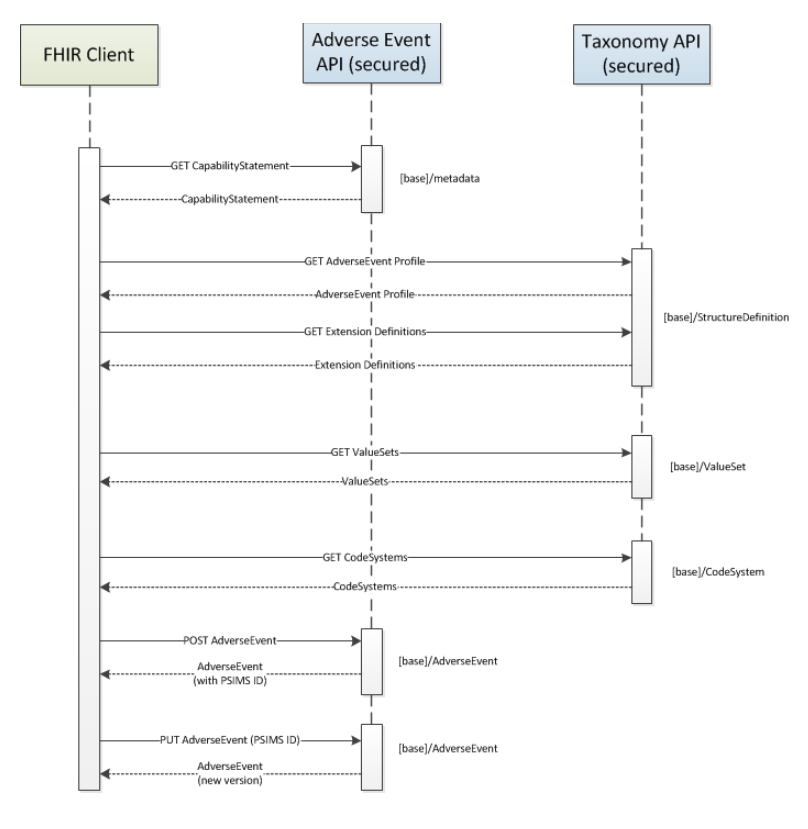
The diagram illustrates the order in which requests must be made in order to build a full picture of the LFPSE FHIR conformance resources. A client must be able to access all of the conformance resources in order to build a compliant Adverse Event resource.
Taxonomy spreadsheets
Two separate spreadsheets provide data on help text, labels, show in app and required.
These are located in
/meg_forms/audit_builder/lfpse/dataWhen building questions, this data is imported via pandas.
Question flow chart
This defines the questions available in the Taxonomy API which should be shown to users, and in what order.
It’s a pdf document with series of separate flow charts.
This is translated into python in
audit_builder.lfpse.question_flow.py.Any changes to the question flow in subsequent version should be mirrored in
question_flow.py
LFPSE Go Live Procedure
This describes the process of migrating an LFPSE environment from the development API to the production APIs. Once complete the customer will be able to submit LFPSE data to the production API.
Confirm that the ODS code of the institution used in the
LFPSEBackendis correct. This can be confirmed by the client. If incorrect submissions may be rejected automatically by the submit API.Instruct the client to update their
LFPSEBackendtoken in the user facing dashboard settings page. This can be found here: http://localhost:8000/test-institution/dashboard/settings/lfpse-backendsNote
This link is different for every institution.
Note
According to the LFPSE team, the token is private and can not be shared with the integration software provider (MEG). For this reason the client must insert it themselves.
On django admin, change the submit endpoint to:
And change the taxonomy endpoint to:
For each form link, run the following django admin action:
Build LFPSE field links and questions. This can be found at this page:Inform the client that the LFPSE environment is live and that they can start submitting data.