Ringfencing
Ring-fencing refers to ability to limit what items user can see in the system.
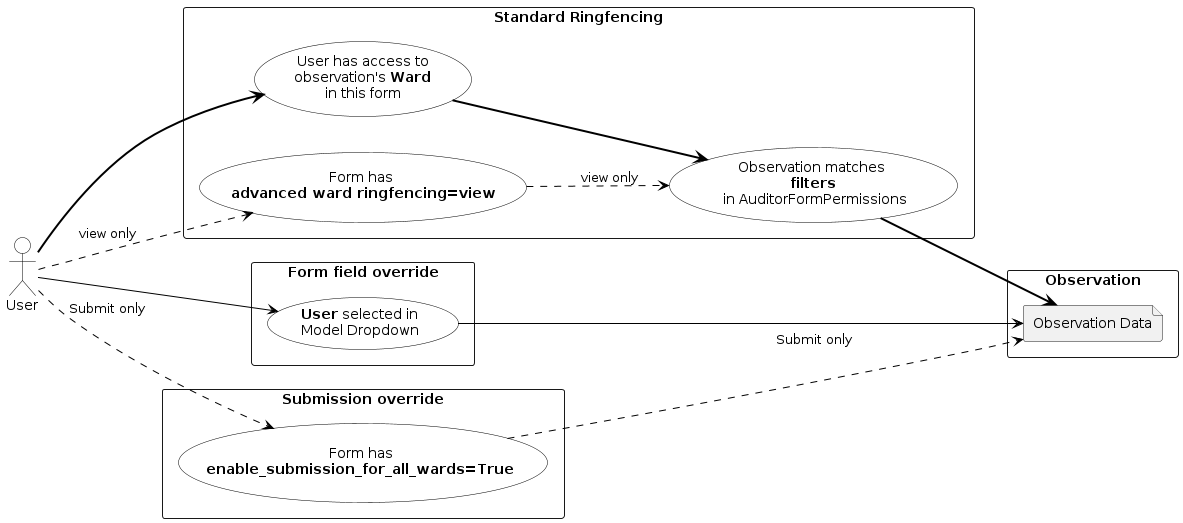
Ward ringfencing
User profile can be limited to a subset of wards in the their institution.
If user profile has wards, it means the user is limited to accessing data associated with those wards only.
By default, user has access to all wards in the institution.
Note
User access to wards can also be limited per form by overriding user form permissions.
Warning
There are exceptions to the above ringfencing rules:
- form setting:
A form can override ringfencing and give user read-only access to observations within that form. This is controlled by setting
advanced ward ringfencingform configuration to “Allow user to view data, but not edit”.Users can also submit data to wards outside their ring-fencing if
enable_submission_for_all_wardsis enabled.- model field:
In forms having a model field relation to Auditor (user profile) model, user can view observations where they are selected as a choice, including multichoice model fields.
User ringfencing
Typically users can see other users within their institution or institutions (group level users). User’s visibility of other users on the system (even in the same institution) is further ring-fenced based on what forms users have access to.
Currently the two users must have access to the same forms in order to see each other’s account on the system.
These rules are implemented in megforms.models.AuditorQueryset.for_auditor().
Note
users who don’t have access to any forms are visible to all other users, but they themselves can only see only users who also don’t have access to any forms.
See also
Ring-fencing by audit form was implemented in Task #22498. The ring-fencing rules may change in the future. Please see Task #25706 for more up to date details and discussion.
Observation ringfencing
Access for a audit form observations can be ringfenced by adding or updating existing
AuditorFormPermissions record for required users and audit form
then setting up filters field with required filters based on existing CustomField.
{
    "test_select": "A",
    "test_select2": ["B"],
    "test_multiselect": ["A", "B"],
    "test_auditor": "{auditor.id}"
}
A ObservationQueryset can be directly ringfenced using ObservationQueryset.for_form_auditor and ObservationQueryset.for_forms_auditor methods by providing the audit form and auditor arguments.
Note
Filters for any field can be either a single value “A” or multiple values [“A”, “B”], for single choice fields filters would be “exact” and “in” for array values, for multiple choice fields filters would also be “in”.
Model dropdown override
If a user model dropdown is added to the form, users selected in this dropdown will have access to the observation. This overrides the following:
ward ringfencing
observation ringfencing