Project set-up
Using docker compose
As an alternative to setting the project directly on the PC, it is possible to run it inside a Docker container.
It is recommended to use docker compose plugin version 2.22 or newer. Note the difference between docker-compose (standalone) and docker compose (docker plugin).
# Run the project in the background (re-builds project before running if needed)
docker-compose up -d --build
# And shut down with a separate command
docker-compose down
# When working on the project, it may be useful to add --watch to automatically update any changed files
docker-compose up -d --build --watch
# or simply:
docker-compose watch
# Add -v to also remove volume - wipes local mat database so it can be re-set:
docker-compose down -v
# To run tests in docker:
docker-compose run cms python manage.py test
# migrations
docker-compose run cms python manage.py migrate
Enable HTTPS in development
When running project in docker, you can also start the https service to also serve it via HTTPS using a self-signed certificate. https is a proxy, so you only need to re-build cms service when making changes to the project.
When https service is enabled, the project is available at localhost:8443 port in addition to the default 8000.
profile=https to the docker command# Enable https profile, proxying site via HTTPS port
docker compose --profile https watch
# Also include --profile https when stopping server, to also stop the https service
docker compose --profile https down
Note
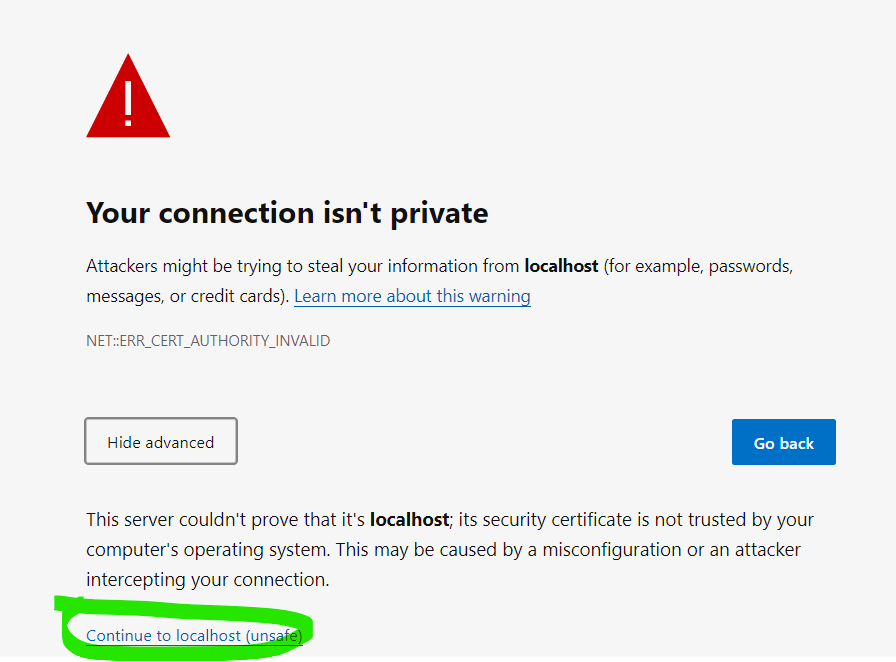
When navigating to the development HTTPS page, you will see a browser warning about unsafe certificate. As the certificate in local development is not signed by an authority trusted by major browsers, this is expected. Simpy click Continue to localhost (unsafe) to continue.
Running manage.py commands in Docker
Use docker compose run to run any commands within docker containers.
Note
Some commands will run automatically when you run docker compose, so there’s no need to run setup database script, migrations, or compile translations.
There are multiple options to run commands in docker container. Here are some examples using update_perm_cache command:
- Once-off command
docker compose run cms python manage.py update_perm_cache
- Shell into container and run multiple commands
docker compose run cms bash
./manage.py update_perm_cache
Persist changes to docker filesystem
If you’re running a command that makes changes that you need to commit to the repo (such as makemigrations), you need to mount your local filesystem to the container before running the commands.
meg_forms directory to run management commands against itdocker compose run -v $(pwd)/meg_forms:/mat/meg_forms cms python manage.py makemigrations
Tip
if you use an ide like PyCharm, it will do it for you if you set docker as the environment, and run management commands within IDE.
Resetting environment
If you’re having issues with running the project, you can wipe the database and re-build it using the following commands:
docker-compose down -v
docker-compose up --build
Run in Python virtualenv
Pre-requisites
You need to install the following on your system before being able to setup the project:
Python 3.12
Postgres 16
Redis (Optional, used for Celery tasks and caching)
-
unzip and add the
bindirectory to systemPATH. Java (Optional, used to build documentation)
Installing Python:
On Linux (Ubuntu), Python can be installed from Deadsnakes repository:
sudo add-apt-repository ppa:deadsnakes/ppa
sudo apt-get update
sudo apt-get install python3.12 python3.12-dev
On any other OS, Python can be downloaded from the official website.
Set up the project
virtualenv . --python=python3.12
source bin/activate
pip install --upgrade pip
pip install -r requirements-dev.txt
./setupdatabase.sh
python manage.py runserver
Switching between branches
When switching between branches, make sure to install any new dependencies and apply migrations:
If
requirements.txtis changed:pip install -r requirements.txt --upgrade. Run this command again when switching back to master or another branchIf any migrations are added:
python manage.py migrateWhen switching away from branch with migrations, you need to reset your database:
./setupdatabase.sh.If the above don’t work, reset the project by running
git clean -dfxand then following steps listed in “Setting up the project”.
Run test server in production mode (docker-compose)
The docker-compose.prod.yml contains docker-compose configuration to aid running the server with production settings.
This will closely mimic production server in terms for sending e-mails (instead of logging) and handling errors.
sh/run-testserver.sh script can be used to run one or more such servers independently.
Optional port argument can be specified to select http port on which the CMS service will run.
Optional name argument can be specified to run multiple instances and label them. If blank, the name will be auto-generated
Usage:
sh/run-testserver.sh (port) (name)
Run Test Region
Sometimes we need to test functionality across regions. We can easily create an upstream and downstream region in a couple of commands.
Wipe existing container volumes for upstream and downstream regions:
docker-compose down -v
docker-compose --project-name region-8001 down -v
Deploy both regions:
docker-compose up -d
sh/run-prod.sh
Wait for the db migrate job to finish in both containers. Once completed the upstream container will be listening on port 8000, and the downstream on 8001. They’ll both be linked so you can start testing immediately.
To verify they’re connected you can visit /meg-admin/regions/region/ in both containers and run the action to validate the authentication token.
Test user accounts
A freshly setup project will have the following user accounts:
Username |
Password |
Role |
|---|---|---|
admin |
password |
superuser |
senior |
password |
lead (senior) auditor, staff |
junior |
password |
junior auditor |
groupauditor |
password |
lead auditor (InstitutionGroup level) |
globalauditor |
password |
lead auditor (global level) |
janitor |
password |
issue handler |