Glossary
- API
Application Programming Interface; an interface for computer programs and other services to interact with the system. In MEG QMS API urls start with
/api(such as /api/v2/) and outputs data in JSON format by default. Latest API documentation can be found in External documentation section.- Audit Form
- Form
Represents a set of fields along with other metadata and can be either divided into subforms, or be a Flat form. Answers to questions in a form are stored as Observation while subform questions are stored in Sub-observations. A form that has subforms should not have any questions that don’t belong to any subform.
Note
The term “Audit Form” is not longer used as many more form types are now supported besides “audit”.
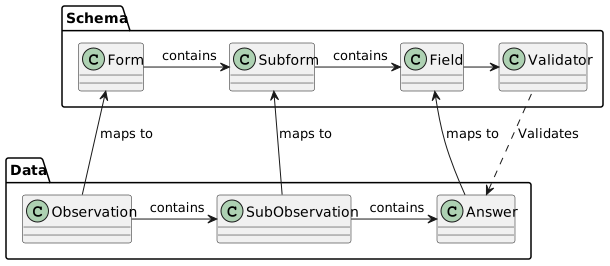
Diagram showing relation between the various form components and its submitted counterparts containing data
- Audit Session
Contains a set of observations made during a single session and submitted together. Includes information about when the session started/ended, by whom, and in which ward.
- Auditor
- User profile
Links user account to an institution giving it additional context of which forms and wards user can access.
Auditors can have various access levels:
- institution level
can access only the institution they are assigned to
- group level
can access the institution they are assigned to, but also other institutions within the same institution group (if any)
- global level
has access to all institutions within region. This is a special level above group level that does not appear in any clients’ settings page as it is commonly used by MEG staff to assist clients.
- restricted institutions
overrides what institutions the user has access to. Provides a way to limit the institutions a global user can have access to. Can also be used to restrict an institution group user to only have access to certain institutions inside their group. This functionality cannot be applied to institution level users.
Note
User profile was formerly labelled “Auditor” but due to the nature of the product expanding and no longer limited to auditing, a more generic “User profile” label is now used.
- line manager
A line manager is a person in an organization who has direct responsibility for managing employees and their day-to-day work. A user can have a line manager in MEG. This attribute can be synchronized from a SAML integration.
- direct reports
Employees who report into a line manager. An employee can only have a single line manager.
- Auto cycle
A feature that allows automatic cycling through the field’s options, while enabled for a specific field, client app will require the user to create an observation for each option in the selected field, and won’t allow the session to be submitted unless all observations are filled.
To configure the auto cycle field, you need to fill the “Auto cycle field” in form config.
Note
Auto cycle feature can only be enabled on flat forms
- Business Intelligence
The strategies and technologies used for the data analysis and management of business information. This process may use client data in MEG, or data from other platforms such as Redmine.
- Client app
A web-app separate to the dashboard used for data entry into the system. It can be accessed by web browser, or by installing the app from Google Play, Apple App Store, or Windows Store.
- Common Issue
Represents a commonly occurring issue. List of common issues can be compiled per form or form type and the client app uses such list to provide suggestions to the users while filling out the form and reporting new issues.
- Compliance
a measure of adherence to policies. In the context of forms and auditing, compliance if effectively a score in the range between 0% and 100% based on answers given in an observation, or sub-observation.
See also
- Compliance schema
A subset of Form schema that only includes fields and settings that affect compliance.
- Compliance Weight
Allows biasing average compliance by calculating weighted average.
See also
Compliance weight documentation
- CSRF
Cross Site Request Forgery; A Cross-site request forgery hole is when a malicious site can cause a visitor’s browser to make a request to your server that causes a change on the server. The server thinks that because the request comes with the user’s cookies, the user wanted to submit that form. Django provides protection against CSRF by default, but this can sometimes lead to errors when the same web form is submitted twice.
- Custom field
A question within form (flat form), or one of its sub-forms. A question can be hidden from initial submission, or its answer made editable in the review page. A “Custom” field relates to the fact that form is customized, and its questions are build and set-up in admin interface rather than hardcoded.
- Custom form
a form whose questions can be customized in admin interface. It’s “observation model” is “custom observation” which represents a blank form, and questions are added either in /dashboard/settings/audit-forms/ or /meg-admin/audit_builder/customfield/. A custom form consists of custom questions, but can include custom subforms, validators and other features not available in hardcoded forms.
- Dashboard
An overview with a grid of widgets presenting data submitted to form, institution, or entire institution group.
Note
Sometimes “dashboard” can refer to the back-end in general, not just the page of widgets.
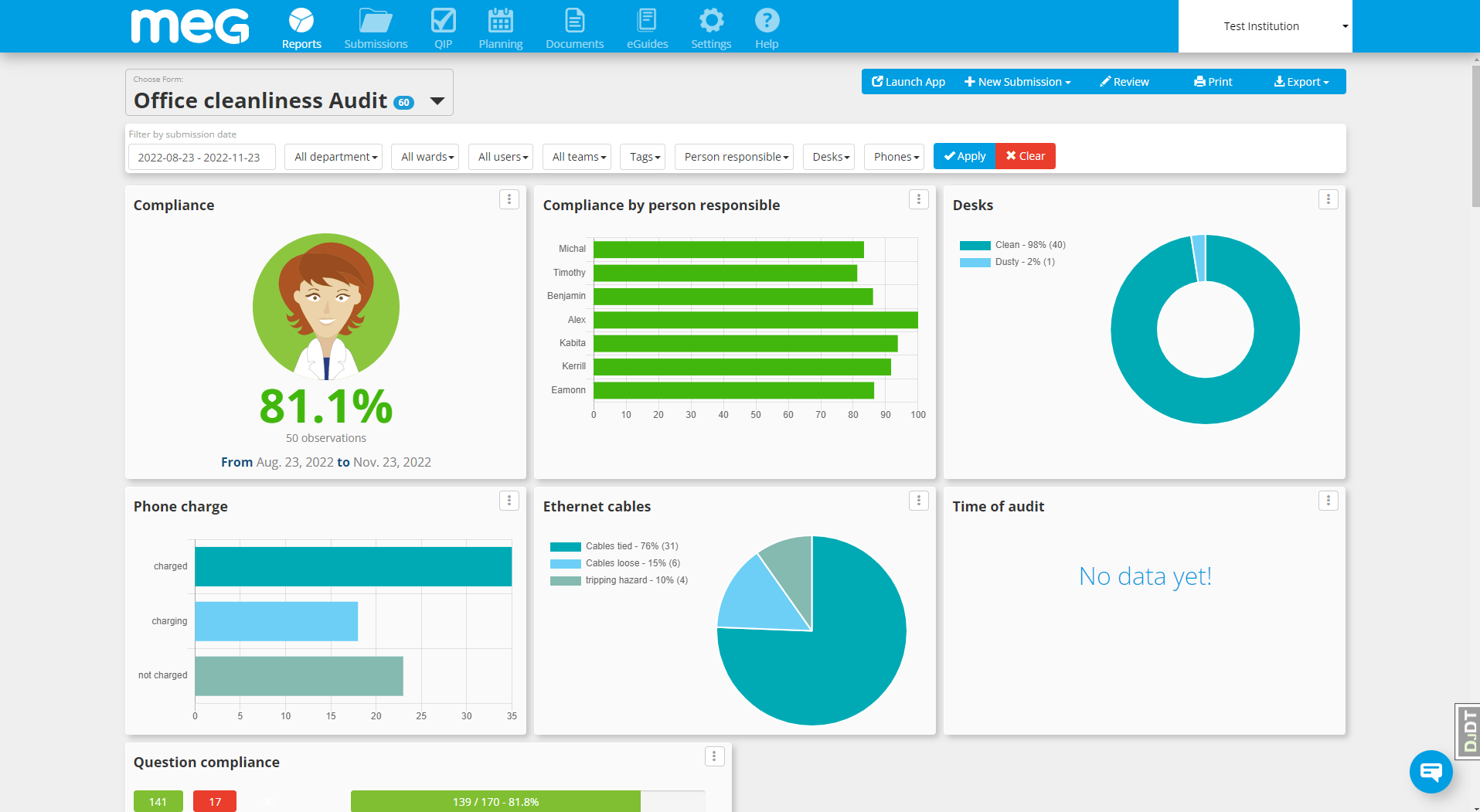
Form dashboard view
- Dashboard widget
- Widget
A building block of dashboard, can be configured to represent data.
See also
Various widget classes are documented in Dashboard widgets.
- Demo account
An account used by staff for product demo purposes. Access to this type of account can be shared between staff, and it’s features may be limited. It is not possible to log in to this account using password. Access is only granted using dedicated interface implemented in Task #26669.
- Department
Represents a group of locations within institution. Department have multiple wards grouped to it.
- diff
Short for “differences”; a view that highlight changes between two versions: parts removed (typically in red, crossed out) and added (in green) between the versions of the text.
- Django
A Python framework used to build web apps such as MEG QMS.
- Django admin
Admin interface provided by Django. Only staff users and by extension superusers can access this interface. It can be accessed at /meg-admin/. Staff users can only access items they have permission to view or change.
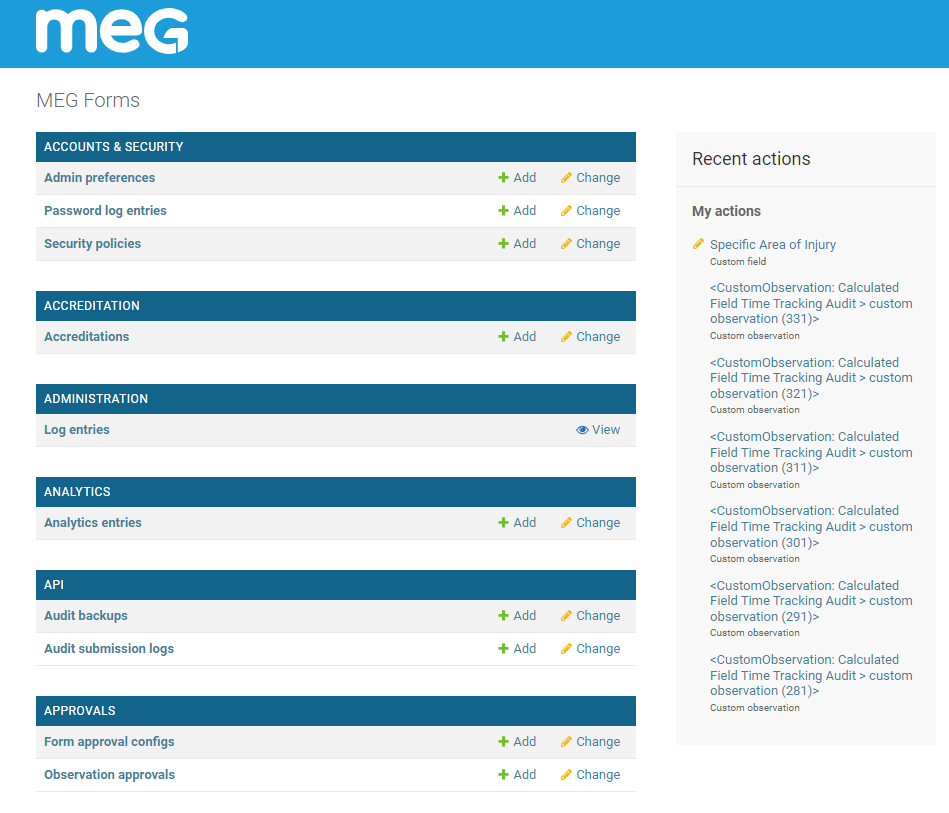
Main page of django admin viewed by a superuser showing a list of models they can access.
- DKIM
DomainKeys Identified Mail (DKIM) is an email authentication method designed to detect forged sender addresses in email (email spoofing), a technique often used in phishing and email spam.
- DMARC
Domain-based Message Authentication, Reporting and Conformance (DMARC) is an email authentication protocol. It is designed to give email domain owners the ability to protect their domain from unauthorized use, commonly known as email spoofing.
- Document
An item in MEG Docs containing a PDF file (other formats also supported) and its associated metadata (tags, description, comments, review schedule, etc), may have multiple versions, but only one of them can be considered “current” and served to the users viewing the document. A document can be organized by adding tags, or placing it in a folder
- Draft
- Document draft
An editable version of the document that can be modified in MEG Docs and published when ready. Draft contents is stored in
DocumentDraftmodel. When its submitted, its contents is rendered to PDF and it becomes aVersionready for review.- eGuide
A MEG product offering medical guidelines. This used to be hosted at eguides.megsupporttools.com, but is being merged into MEG QMS as a module. The eGuides currently have a separate mobile apps for Android and iOS.
- Flat form
A form that does not have any subforms and therefore its observations do not divide into sub-observations.
- Folder
- Document folder
Groups multiple documents; Folders can be nested, and define
access rulesto its sub-folders and documents.- Form Config
Contains client-facing configuration and preferences related to form.
- Form schema
A set of fields in the form, including subforms, validators and other related items. Schema is generally self-contained such that it can be represented in a single json feed and used by the client app to reproduce the form and display it to the user in its full form.
See also
- Group
- User group
- Permission group
Groups users and permissions to easier manage and grant permissions in bulk. User can be assigned a group of permission by adding the user account to the group. Each group can have accompanying Group description object that provides a translatable name and a help text explaining the purpose of the group.
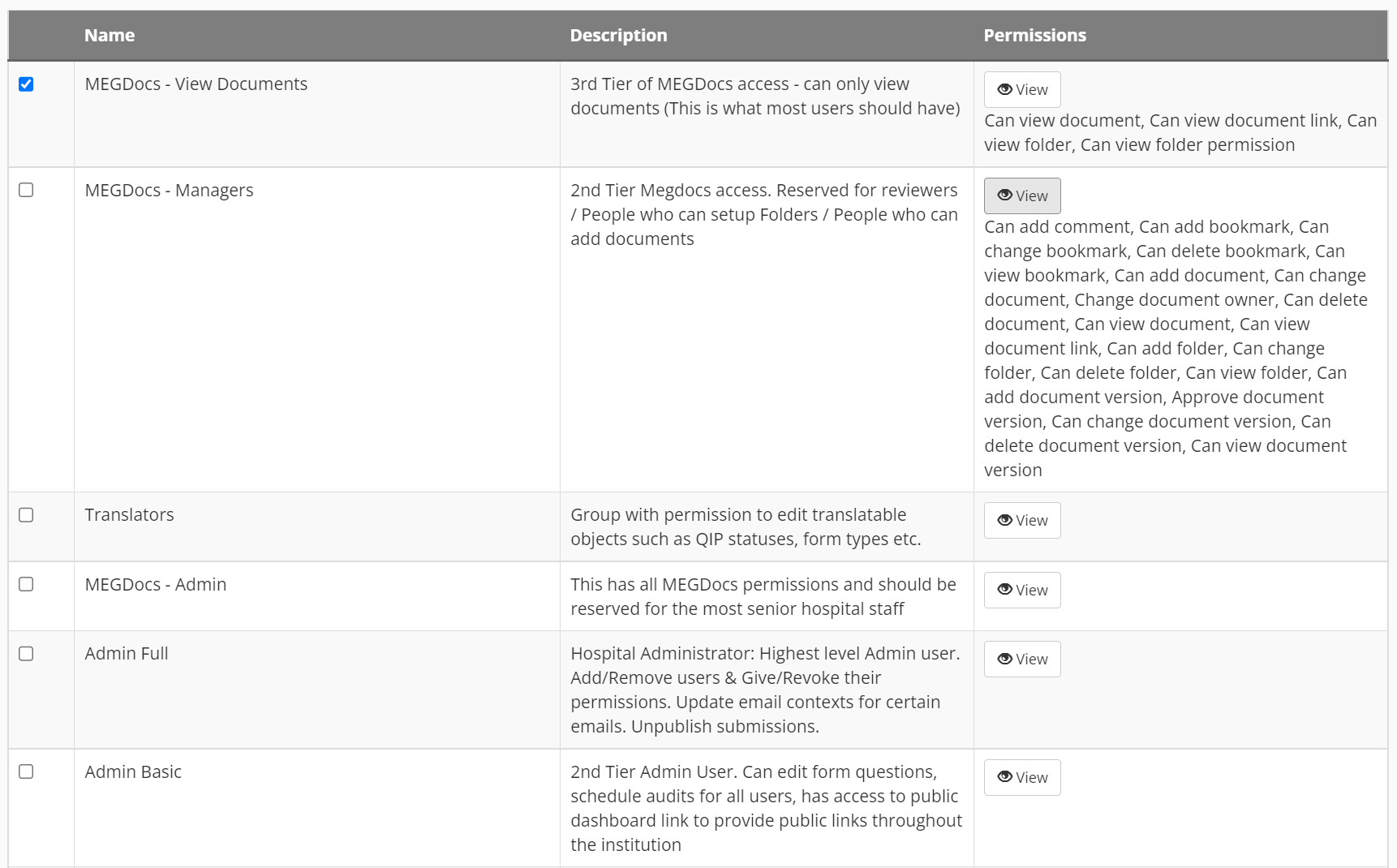
Example list of permission groups with description and permission names showing in some of them
- Group level
- Group-level
in the context of institution group, group-level means that the item is a part of the group rather than individual institution.
See also
Read more about levels in Group & Institution levels
- Hardcoded form
a legacy form whose questions are pre-defined based on selected observation model (Hand Hygiene, IPC, etc.). Hardcoded forms have a limited customization options.
- HIQA
Health Information and Quality Authority. A hardcoded environment audit within MEG QMS.
- HPSC
Health Protection Surveillance Centre; Irish body where environmental audits are submited to.
- Incompliant
Compliance of 0%, or less than “pass second” value defined in the form config, depending on context.
For questions with calculation logic of “required”, compliance of anything less than 100% is considered incompliant.
See also
- Institution
Represents a hospital or another institution. Institution can be a part of an Institution group or standalone. Institutions are further divided into departments, wards and (optionally) rooms:
[Institution Group] -> Institution -> Department -> Ward -> [Room]
Labelling of Ward and Department can be customized on per-institution basis.
- Institution group
Groups institutions into a single higher-level entity whose users can access the same set of forms.
Note
The term “group” can often mean user group depending on the context.
- IPC
Infection Prevention Control Ireland. A hardcoded audit within MEG QMS.
- Issue
Represents an item raised during audit that can be assigned and resolved. Issue can be associated with a ward, room and observation / sub-observation.
- Issue handler
A user with the permission to view and edit issues.
- JSON
JavaScript Object Notation; a format used to communicate data between services, but also storing configuration objects. JSON format is typically wrapped in curly braces and can contain strings, numbers, booleans, arrays, or objects (mapping of strings to a valid JSON value).
An example of JSON object showcasing various possible data types{ "string": "a string", "numeric": 67, "boolean": true, "empty": null, "object": { "name": "Meg", "number": 7 }, "array": [1, 2, 3, 4] }
- MAT
Meg eAudit Tool; A deprecated name for MEG QMS
- Media files
user-uploaded files such as images, documents etc.
- MEG Academy
MEG Academy is the latest module from MEG, our own learning management system MEG QMS.
- MEG Docs
Document management system component of MEG QMS. Allows users to upload documents, version them and organize into folders.
- MEG QMS
- QMS
Quality Management System
- MEG Workflows
MEG Workflows is a module within the MEG QMS that automates and streamlines processes. It enables to define, manage sequences of tasks. This flexible framework supports configurable stages and operations.
- Migrations
Scripts responsible for updating the database with any new fields added to models (schema migration) and manipulating existing data match the new table/field structure (data migration). Migration is a necessary step whenever deploying an update to the server.
Important
when rolling back to a previous version, it is important to un-apply all migrations applied during the upgrade. Failure to do so will lead to crashes and errors.
An alternative to rolling back migration can be restoring database from backup.
See also
- Model
Base building block for data model. Models describe (type of) objects in the database, what fields do they have, their relation to other objects and other meta properties, such as name, default ordering etc. An example of model is institution, auditor, or ward.
- Mongodb
A document-oriented database program. Classified as a NoSQL database program, MongoDB uses JSON-like documents with optional schemas.
- NPS
- Net Promoter Score
A metric used in customer experience programmes. NPS measures the loyalty of customers to a company. NPS scores are measured with a single question survey and reported with a number from -100 to +100. A higher score is desirable.
Responders are grouped into 3 groups: Promoters, Detractors, Passives. To calculate NPS score, subtract number of detractors from number of promoters:
% Promoters = (Number of Promoters / Total Number of Respondents) * 100
% Detractors = (Number of Detractors / Total Number of Respondents) * 100
NPS = % Promoters - % Detractors
- Observation
Represents a filled-in form instance. It will contain or more sub-observation if the form has subforms. Also known as “Entry”.
- Per form permissions
A user can have per-form permissions, including group membership (in addition to user’s own permissions and groups), and ward access. This is defined using form permission sets.
This was originally implemented in Task #25847
Warning
While adding permissions and groups to the set expands user’s permissions in context of the form, adding wards overrides wards visible to the user and can result in user having access to less wards than in other forms.
- Permission
A pair of model and action that describe what action is allowed to be carried out on particular model. By default django provides view, change, delete, create permission for every model. Additional permissions can be defined by developers on per-model basis.
Note
Superusers implicitly have all permissions, so there is no need to any permissions or groups to those users.
See also
Permissions documentation
- Push notification
- Push message
A system notification sent (pushed) by back-end as opposed to a local system notification. A push notification often notifies user about incoming e-mail or other message. At MEG we use Urban Airship to send notifications from the back-end to user devices running the client app.
- QIP
Quality Improvement Plan; a module in in the system for logging and resolving issues. This module is tied to a form, so it can be enabled and customized in form configuration.
- Question
A field within a form. It can be a custom field, or a model field in a Hardcoded form.
- reCAPTCHA
- CAPTCHA
A “CAPTCHA” is a turing test to tell human and bots apart. reCAPTCHA is a free service from Google that helps protect websites from spam and abuse.
- RegEx
Regular Expression; a sequence of characters that specifies a search pattern in text. Usually such patterns are used by string-searching algorithms for “find” or “find and replace” operations on strings, or for input validation.
A sample regex used to validate an e-mail address([a-zA-Z0-9\_\-\.]+)@([a-zA-Z]+).(.+)
Use a site like RegExr to write and test a regular expression.
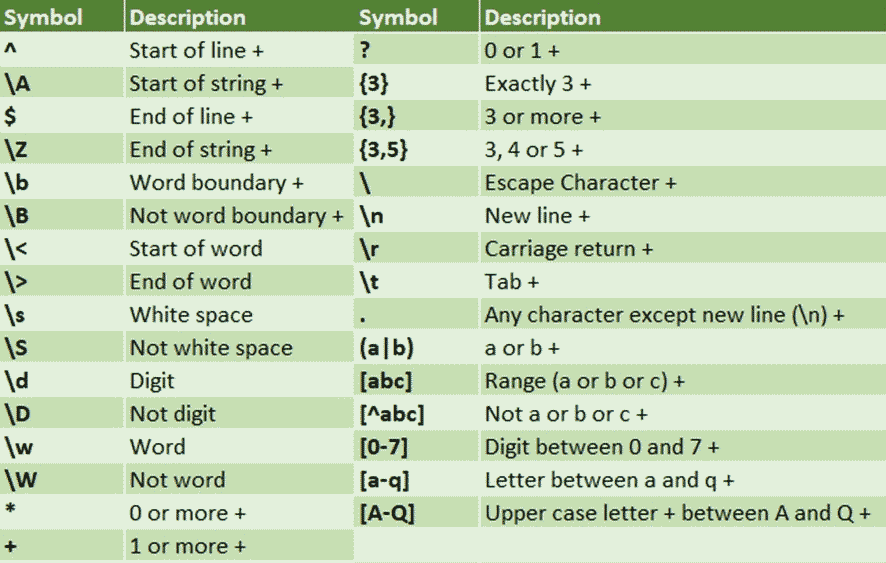
RegEx cheatsheet with some commonly used symbols
- Region
A production deployment; The main region is the EU. Users from other parts of the world use their local region. Usernames are unique across all regions, so user can log into the EU server and be redirected to their correct region. The client app is also pointed at hte EU region and redirects user at login to the correct site.
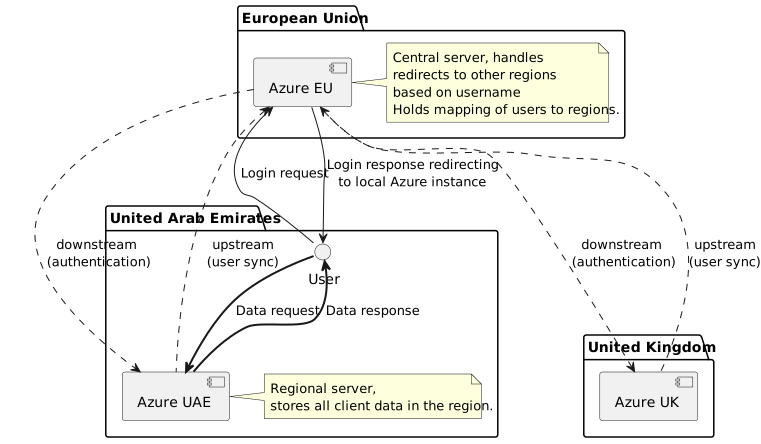
Diagram shows interaction between regions and data locality.
- Report Rule
- Report CC
A rule that defines which users should receive e-mails for which events and locations. Please refer to Report rules for more information.
- SPF
Sender Policy Framework (SPF) is used to authenticate the sender of an email. With an SPF record in place, Internet Service Providers can verify that a mail server is authorized to send email for a specific domain.
- Staff
A user account who has access to the django admin panel. User will have access to a subset of models and actions in the admin panel as defined by their permissions. If staff user is also an auditor, their access is limited to the their institution or group depending on access level.
- Static files
images, java scripts, stylesheets and other supporting files that are bundled with the product and are served directly as opposed to generated using python script.
- Sub-issue
An issue can be divided into sub-issues if enabled in form’s config. There is only two level of issues allowed: parent and sub-issue.
- Sub-observation
Subcomponent of observation that contains answers to subform questions. A typical observation will have at most one sub-observation per subform, except for subforms that are setup to be filled out multiple times.
Warning
Some references in the codebase incorrectly refer to subforms as sub-observations. This is being slowly worked on and some references may still remain.
- Subform
A set of fields within form that groups questions. Questions answered in a subform are stored in a sub-observation. Typical subform will have 1 or 0 sub-observations within observation, but when “many” option is enabled for a subform, it can be filled-in multiple times per-observation.
- Submission report
- Public report
a single-page dashboard showing data for a single audit session. Its url is unique per audit submission, but report can also be built from multiple submissions by selecting multiple sessions in “Reports” tab and licking “generate report”. Formerly known as “public” report, it has been renamed to “submission” report as it is no longer publicly available by default.
- Superuser
A staff user that has implicit access to all items in the system and all permissions.
- Team
A collection of users, can be used to grant access to forms or eGuides in bulk.
- Template
- Document template
A predefined body of a document that can be applied when creating a new document draft. Once applied, the document is not associated with the template and any subsequent changes are not reflected in documents created from the template. Templates are stored in
DocumentTemplatemodel and associated with an institution.- Track Changes
- Suggest Changes
A mode in a document draft editor that allows the user to suggest changes to the document rather than make changes directly. Suggested changes can be later accepted or rejected.
See also
Suggesting changes feature documentation
- two factor authentication
an additional level of security where user is required to enter a token received by sms or using an authenticator app in addition to their password. This feature can be enforced enabled in Security Policy. Users can enroll into two factor authentication individually in Account Security page.
- Un-publishing
Unpublishing a model, or marking it as not “published” is a mechanism used to mark items as no longer visible to the user. It is done by un-ticking “publish” checkbox in a model’s admin page, or by end user when they remove an item in dashboards or settings page.
See also
More detailed documentation in Removing/un-publishing data
- Version
- Document version
A named iteration of a document in MEG Docs. Represents a document at a point in time. A new version can be submitted for review, accepted or rejected. A published document can have only one “current version”. which is updated whenever a new version is published.
- Ward
Represents a location within institution. Wards are grouped by department.
- Ward Manager
A user identified as the manager of a given Ward. A Report Rule can be configured to send notifications to ward managers only.
- Web Form
A link to a form that can be accessed in the web browser to input data without launching the client app. A web-form link requires login by default, but can be set-up to allow anonymous users to fill out the form by designating a public User profile where collected data is attributed to.
Note
A Web Form can only be added to a flat form