VPN Connections
VPN Connection is possible from Azure ASK cluster to client’s network to access their on-premises services such as Active Directory, or patient records.
Creating a new connection
Follow the steps below when creating a new VPN for outoing connections to access on-premises services. Incoming VPN connection is not likely needed as MEG QMS is publicly available to the internet.
Create a VPN Virtual Network gateway
SKU VpnGw2 or higher as required
link the gateway with the VNet of the relevant service
Define NAT rules for egress
consult client on available network subnets
Use Dynamic NAT if network on client side is smaller and return connections are not expected
Create a Local Network Gateway to client’s spec
Create connection
Consult client on connection properties
Test the connection
Ensure the connection status is “Connected”
run a tool such as ping or telnet from a device in the network to make a test connection
Tallaght University Hospital (TUH)
VPN connection with TUH was established from the EU cluster as a part of Task #26574. The connection facilitates user authentication against client’s Active Directory service (LDAP, Task #27338).
Connection components
Components of the connection in Azure:
- Virtual network
Virtual network in Azure, contains the
10.240.0.0/16subnet (aks-subnet) dedicated to AKS Nodes. Kubenet translates Pod addresses into this subnet. This component of the setup was created by Azure while setting up kubernetes cluster and did not require any customization.- Virtual Network Gateway
Network gateway in the cloud, bridges VNet with other connections. Defines NAT rules for egress. Dynamic address translation (Dynamic NAT) is used to translate MEG subnet addresses from
/16network into a smaller/26network made available by the TUH.Properties:
SKU: VpnGw2
Type: VPN
VPN type: Route based
IP address: 20.160.171.52 (qms-eu-vpn-gateway)
NAT Rules:
Name: Dynamic16-26
Type: Dynamic
Mode: Egress
Internal Mappings: 10.240.0.0/16
External Mappings: 172.31.2.0/26
- Connection
Represents the connection between virtual gateway and local gateway.
- Local Network Gateway
Represents client’s gateway. Defines network routes for addresses on client’s network.
- IP Address:
137.191.244.20
Address spaces:
172.26.128.101/32
172.31.40.50/32
Network diagram
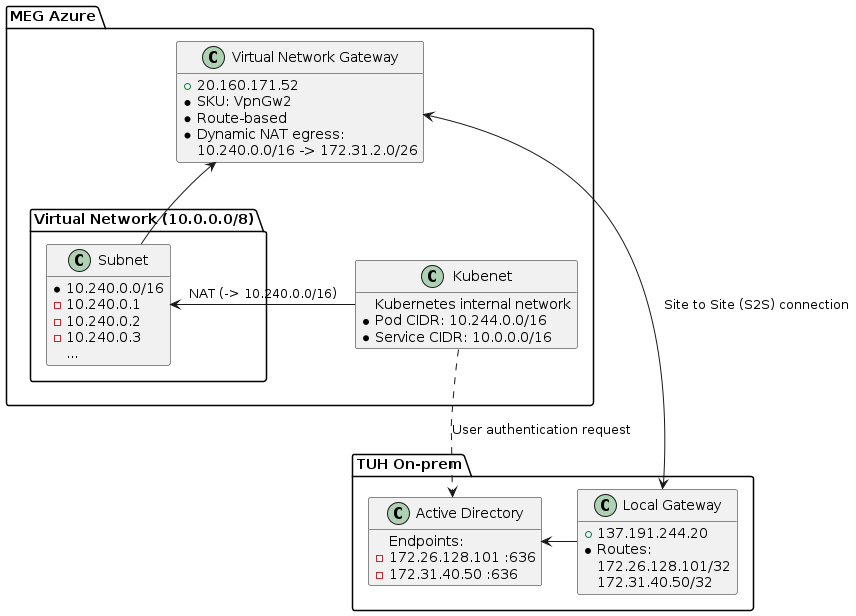
Diagram representing network topology between MEG and TUH networks. Dynamic NAT is used to translate MEG VNet into an address space availalbe in TUH network.
Troubleshooting
Test VPN connection
Test connection can be made from a kubernetes node. Please make sure that the IP address and port match the LDAP setup.
root@aks-agentpool-31265176-vmss00020W:/# telnet 172.31.40.50 636
Trying 172.31.40.50...
Connected to 172.31.40.50.
Escape character is '^]'.
Connection closed by foreign host.
root@aks-agentpool-31265176-vmss0002CB:/# telnet 172.31.40.50 636
Trying 172.31.40.50...
telnet: Unable to connect to remote host: Connection timed out
If there is an issue connecting to the address:
Check that the connection status is “connected”
Contact the client if connection status is “Not connected”
Verify that the connection shows outgoing and incoming traffic
Contact the client is there is outgoing traffic, but not incoming
verify that the IP address is listed in Local Network Gateway’s Address Space
if not, ensure the address is correct, and add it
Test LDAP setup
LDAP set-up can be tested in django admin using “Test connection” action:
Got to identity provider admin page
Check the TUH provider
Select “Test connection” at the top of the page and click “Go”
Any errors at this point would be due to incorrect LDAP setup