Single Sign-On
Glossary
- Active Directory
A single sign on solution from Microsoft. Uses LDAP method of authentication and can be self-hosted, while Azure Active Directory is cloud based and uses SAML.
- DN Path
Distinguished Name Path; A distinguished name path is a LDAP entry that uniquely identifies and describes an entry in a LDAP server. A distinguished name is a sequence of attributes and values. The first attribute and its value provide the entry’s relative distinguished name (RDN). Every entry (user, group, OU, computer) in LDAP will have its own dn path.
- Identity Provider
- IdP
The remote component of SAML that provides user account information. This role is often fulfilled by Azure Active Directory, or Google.
- LDAP
Lightweight Directory Access Protocol; industry standard application protocol for accessing and maintaining distributed directory information services over an IP network. It is used as a centralized user database for Single sign-on.
- OU
Organizational Unit; Containers that can be used to divide the organizational hierarchy. These can represent teams of users. An organizational unit will have its own DN Path.
- SAML
Security Assertion Markup Language; an open standard for exchanging authentication and authorization data between parties, in particular, between an identity provider and a service provider.
- SAML Artifact
- Artifact
When the HTTP Artifact binding is used, the Artifact is a unique ID used by the Service Provider (SP) and Identity Provider (IdP) to reference a specific user session or transaction. The SP can use the Artifact to query the IdP for information about the user.
- SAML assertion
- Assertion
A SAML assertion is an XML document returned by the Identity Provider to the Service Provider after authentication of the user. The assertion has a very specific structure, as defined by the SAML standard. A SAML assertion has a <Subject> element which contains information about the user. It might have conditions and attributes associated with the information being conveyed. It is digitally signed and asserts that the user has been authenticated.
- SCIM
- System for Cross-domain Identity Management
SCIM (pronounced skim) is an open, HTTP-based standard that automates the exchange of user identity information between identity providers (like an HR system) and service providers (like cloud applications).
The case of MEG QMS, the API implements SCIM 2.0 protocol to allow SAML IdPs to pre-emptively provision user accounts. This allows the accounts to be manually granted permissions, team memberships before the user logs in for the first time.
- Service Provider
- SP
The local component (MEG QMS) providing hte service and consuming authentication provided by IdP.
- SSO
Single Sign-On; two methods of SSO are currently supported: SAML and LDAP. More details in SSO setup in Single Sign-On section.
SAML
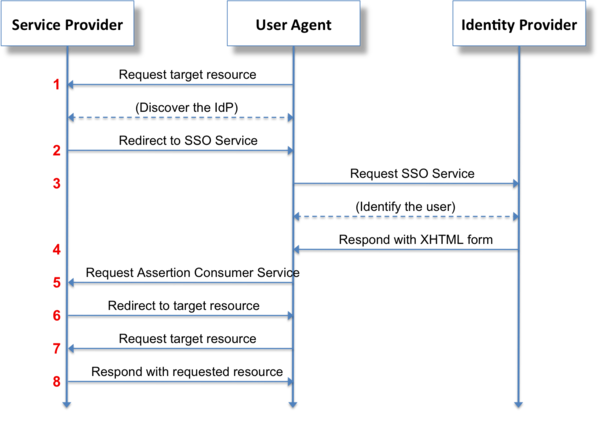
SAML login flow
The IDP container is a test environment for testing SAML integration.
Include saml profile when running project using docker-compose to run SAML identity provider alongside the project:
docker-compose --profile saml up
See also
Client-facing setup is documented in Single Sign On Support document.
Troubleshooting steps are documented in Single Sign On Debugging documentation.
Attribute Mapping
The SAML Identity Provider can map SAML attributes to MEG user properties through the attribute_map field. This enables automatic assignment of user properties during SSO login.
Supported Mappings
- institution
Maps user to an institution based on attributes or email domain
- user level
Sets user access level (institution/group)
- wards
Assigns users to specific wards
- teams
Places users into relevant teams
Example Configuration
{
    "hospital": {
        "field": "auditor.institution_id",
        "map": {
            "cavan": 123,
            "dublin": 456
        }
    },
    "role": {
        "field": "auditor.level",
        "map": {
            "nurse": "institution",
            "manager": "institution_group"
        }
    },
    "ward": {
        "field": "auditor.wards",
        "map": {
            "medical_1": [789, 1011],
            "surgical": [1012]
        }
    },
    "department": {
        "field": "auditor.teams",
        "map": {
            "nursing": [55, 56],
            "facilities": 57
        }
    },
    "email": {
        "field": "auditor.institution_id",
        "map": {
            "hospital1.com": 22,
            "hospital2.com": 33
        }
    }
}
Note
The attribute mapping is validated to ensure:
Only valid fields can be mapped
Values map to existing entities
Institution mapping respects IDP level restrictions
Email domains are properly formatted
Logout
Some SAML setups can provide logout_url. If present, logout should redirec to that url even within the client app.
This means that when user logs out from client app, and the account has a SAML link, the app should redirect to back-end logout
after logging the user out from the app, to also log out from the back-end and identity provider.
MAC OS
Note that on Mac OS you may need to install XML sec library:
brew install Libxmlsec1
Provisioning accounts with SCIM
SAML provisions accounts using Just-in-time methods - provisioning happens the first time the user logs in. This means that user account does not exist until user logs in, and the first login needs to be initiated via SAML, as otherwise MEG QMS is not aware of the account’s existence.
SCIM allows the accounts to be pre-emptively created by the IdP. It exposes APIs to create, update adn delete accounts.
MEG implements the SCIM 2.0 standard for the /Users endpoint. The implementation handles the synchronization of user profiles between the Identity Provider and MEG’s internal user directory.
To set-up SCIM, you need to create an authentication token in MEG Dashboard. Assuming SAML is already set-up:
Open ⚙️ Settings tab
Click SAML on the toolbar
Click ➕ in the IdP row to create the token if one does not already exist
Copy the SCIM url - use this as the base URL
Click the clipboard icon to copy the token itself to clipoard, and paset it in the Identity Provider’s SCIM client.
See also
Integrate your SCIM endpoint with the Microsoft Entra provisioning service explains how to configure Entra ID (Active Directory) to use SCIM to synchronize account data via SCIM.
Attribute Mapping
The following table outlines how standard SCIM 2.0 User attributes map to MEG internal properties.
SCIM Attribute |
MEG Property |
Notes |
|---|---|---|
|
|
Immutable. The unique identifier used for SAML federation. |
|
|
The unique ID assigned by the IdP (e.g., Azure Object ID). |
|
|
Boolean indicating if the user can log in. |
|
|
|
|
|
|
|
|
Only the email marked |
|
|
Must be a valid phone number; converted to E.164 format on save. |
|
|
|
|
|
Read-only. |
Supported Operations
The endpoint supports the following HTTP methods:
- GET (Retrieve)
Retrieves user details. Supports pagination (via
startIndexandcount) and filtering.Supported Filters: You can filter by
userName,externalId,name.givenName,name.familyName,emails.value, andactive.
- POST (Create)
Creates a new user account.
The
userNamemust be unique within the Identity Provider.If a user with the same email exists but is not linked to SCIM, the request may fail or require manual intervention depending on configuration.
- PUT (Update)
Updates an existing user.
While SCIM defines PUT as a full replacement, MEG’s implementation will preserve existing sensitive fields (like
userName) if they are omitted from the request payload to prevent accidental data loss.Restriction: You cannot change the
userNameof a user that has already been linked via SAML.
- PATCH (Partial Update)
Performs partial updates using SCIM Patch Operations.
Accepts a list of operations to add, replace, or remove attributes.
Commonly used by Azure AD/Entra ID for minor updates (e.g., changing a surname).
- DELETE (Remove)
Performs a soft delete.
The user record is not removed from the database to preserve audit trails.
Instead, the
activeflag is set toFalse, effectively revoking access to the system.
Testing
Usage
Run
docker-compose --profile saml up -dTo verify that IDP is running, you can visit: http://localhost:8080/simplesaml
Authenticate using IDP, by following this link: /auth/saml/test-idp/sso/ and entering credentials from the section below
Login accounts
Admin account: admin (secret) - cannot be used for SAML
User: user1 (user1pass) - Lead auditor
User: user2 (user2pass) - Junior auditor
LDAP
The LDAP container is a test environment for testing LDAP integration.
It uses OpenLDAP, and so there are some slight differences with ActiveDirectory’s LDAP implementation.
Include ldap profile when running project using docker-compose to run identity provider alongside the project:
docker-compose --profile ldap up -d
Usage
Run
docker-compose --profile ldap up -dTo verify that LDAP is running, attempt to login with one of the below accounts.
If not using docker-compose to run the project and ldap, you will need to change the connection url of the LDAP Identity Provider in django admin to
localhost:10389.
Login accounts
Each of the below accounts will create a junior user.
User: test (password)
User: test2 (password)
User: test3 (password)
User: test4 (password) - this user will match an existing user via it’s email address to demonstrate user linking.