Enabling Access to MEG Docs
MEG Docs is disabled by default and has to be enabled for institution or group
by creating a MegDocsConfig object with the following minimal config:
{
  "enabled": true
}
Enabling Access to MEG Docs
Individual users need to have megdocs.view_document permission to access the document management system.
This grants them access to all root level documents within the institutions they are a part of.
Note
User may still be able to access documents even without access to the root folder.
FolderPermissionRule can grant a user access to a folder without granting access to the root directory.
Access to folders
Access to individual folders is controlled by FolderPermissionRule model.
It allows you to specify which users or teams can access documents within the folders,
and set permissions to specify which operations they can carry out on the contents of the folder.
See also
Document & folder levels in Levels section for more detailed access behaviour.
FolderPermissionRule resolution
When checking whether a user can perform an action on a folder, the system resolves which rules apply using the following logic:
Rule resolution order
The rule applied to a folder is determined as follows:
If the folder has a rule assigned directly to it, that rule governs it. Ancestor rules are ignored.
If the folder has no direct rule, the nearest ancestor folder with a rule is used (walking up the tree toward the root).
If no rule exists anywhere in the ancestor chain, institution-wide rules are checked — rules with no folders assigned (
foldersis empty) whoseinstitutionmatches the folder’s institution. These apply to every folder in the institution.If none of the above apply, no
FolderPermissionRulegoverns the folder. The user’s global Django permissions determine access — the same permissions that control access to root-level documents.
Access grant conditions
Once the governing rule is resolved (see above), the user is granted access if any one of these conditions is met:
The user is a superuser.
The user is the folder’s owner.
The user has all
folder_permission_rule_admin_perms(grants access to every folder so they can manage rules).No rule governs the folder at any level and the user holds the required global Django permissions.
The resolved rule includes the user (directly via
usersor via ateamsmembership) and that rule grants the required permission(s).
If a rule governs the folder but does not include the user, access is denied — even if the user holds the required permission globally.
Folders with multiple applicable rules
If a folder has its own rule, that rule governs it — ancestor rules do not apply to that folder.
If more than one rule is assigned directly to the same folder, access is granted if the user is included in any of them with the required permissions. There is no conflict resolution between rules at the same level — they are additive.
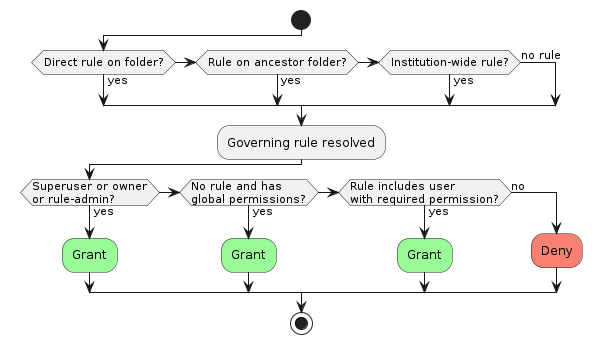
FolderPermissionRule resolution and access grant flow
Permission cache
Users permissions to documents and folders are compiled into a cache that helps optimize DMS performance to acceptable levels.
This can introduce a delay after a user or document is added, or permission changed until the permission cache becomes effective.