Testing
Python / Django tests
The project is set-up to run tests in CI after every push to repository. To run full test suite in the project locally:
python manage.py test
Model bakery
The project uses model-bakery package to create dummy models for testing.
Important
Default field values can be hardcoded using MegBaker.make in model_generators.
An example of this:
if issubclass(self.model, CustomField):
    if not attrs.get('widget'):
        attrs["widget"] = self.DEFAULT_CUSTOM_FIELD_WIDGET
This sets the widget to always be ‘TextInput’ so it never fails pipelines when populated with a widget that needs extra configuration.
Test mix-ins
The project contains some helpful mixins to easily create commonly used data for test cases. The mix-ins typically contains configuration fields, that can be overwritten by test to customize test data, and data fields containing objects created by the mixin.
class AuditsListViewTest(HTMXTestMixin, ViewTestMixin, AuditFormTestMixin, TestCase):
    observation_model = HandHygieneAuditObservation
    num_observations = 2
    observation_kwargs = {
        'action': HAND_HYGIENE_EVENT_CHOICES[0][0],
    }
    auditor_perms = 'megforms.view_auditsession', 'megforms.change_auditsession',
- class megforms.test_utils.AuditorInstitutionTestMixin
Provides auditor and institution objects in test classes
- class megforms.test_utils.ViewTestMixin
to be used with any test case extending AuditorInstitutionTestMixin. Logs the user in before each test and provides API token for API tests.
This mixin must be listed before AuditorInstitutionTestMixin
- class megforms.test_utils.TestFieldSpec(field_name: str, field_type: type[forms.Widget] = <class 'django.forms.widgets.TextInput'>, subform_name: Optional[str] = None, kwargs: dict[str, Any] = {})
Represents custom field data that will be turned into a concrete custom field instance by setupTestData
Create new instance of TestFieldSpec(field_name, field_type, subform_name, kwargs)
- field_name: str
Alias for field number 0
- field_type: type[Widget]
Alias for field number 1
- subform_name: str | None
Alias for field number 2
- kwargs: dict[str, Any]
Alias for field number 3
- static choice_field(name: str, widget=<class 'django.forms.widgets.Select'>, *, choices: list[str], compliant_choice=None, subform_name: str | None = None, **kwargs) TestFieldSpec
Helper method to create a test spec for a dropdown field with choices
- static datetime_field(name: str, widget=<class 'django.forms.widgets.DateTimeInput'>, *, subform_name: str | None = None, **kwargs) TestFieldSpec
Helper method to create a test spec for a date/time field.
- class megforms.test_utils.AuditFormTestMixin
Provides audit form object to test class and optionally populates it with dummy data if
num_observationsis set.- execute_oncommit_signals = False
Whether to execute on_commit callbacks required by some signals to trigger celery jobs to calculate compliance, schema change etc. when the test is being set-up
- observation_model
observation model class for the dummy form
alias of
CustomObservation
- num_observations = 0
number of observations to be generated for the test form. The default value
0means that form will not include any dummy submissions.
- observation_kwargs: dict | Sequence[dict] = {}
dict (for all items) or a list of dicts (one dict for each observation) up to num_observations.
- session_kwargs: dict[str, Any] = {}
custom keyword arguments for
AuditSession
- form_answer_comments_enable = False
Whether to enable answer comments in the form
- custom_fields: Sequence[TestFieldSpec] = ()
defines custom fields to be created for this test. Use
TestFieldSpecto define fields required for the test. Generated custom field instances will be output infields.
- form_extra_kwargs = {}
Any additional keyword arguments to be passed to
AuditFormconstructor
- session: AuditSession | None
Session instance generated by the mixin
- subforms: Sequence[CustomSubform] = ()
Subforms generated by the mixin
- observations: list[Observation] = []
Observations generated by the mixin
- fields: Sequence[CustomField] = ()
Custom fields created by the mixin
- update_form_config(**kwargs)
sets provided values on the form’s config object and saves it
- classmethod convert_to_subforms(form: AuditForm, subform_names: list[str]) list[CustomSubform]
Converts given test form by creating subforms within and migrating questions and answers
- Parameters:
form – form instance to migrate, must be a flat form
subform_names – names of subforms to create, must be a non-empty list
- Returns:
created subforms
- class megforms.test_utils.QipTestMixin
Enables QIP and generates dummy issues for the test
- class megforms.test_utils.RelatedFormsTestMixin
- class megforms.test_utils.DashboardTestMixin
Provides test with a custom dashboard
- widgets: Sequence[tuple[type[BaseDashboardWidget], dict[str, Any]]] = ()
define which widgets should be added to the test dashboard. A sequence of widget class and its config.
- dashboard_widgets: list[BaseDashboardWidget]
test dashboard widgets instances
- megforms.test_utils.setup_mock_requests(mock: Mocker, urls: Iterable[tuple[str, Path]], status_code: int = 200)
Setup mock requests in bulk. Calls into
setup_mock_request()with each passed mock url- Parameters:
mock – the Mocker object being set-up
urls – a sequence of pair mapping url to file that should be served as response body
status_code – status of the response
- megforms.test_utils.setup_mock_request(mock: Mocker, url: str, filepath: Path | None = None, status_code: int = 200) None
Setup a mock request by defining a url, and file whose contents should be returned for that url
- Parameters:
mock – the Mocker object being set-up
url – the url being mocked
filepath – the file that will be returned in lieu of the response
status_code – the status of the mocked response
- megforms.test_utils.create_group(name: str, permissions: Collection[str]) Group
Creates a Group object for a given name and permissions :param name: name of the group :param permissions: codenames for permissions that the group should have
- class megforms.test_utils.ChurningFormTestMixin
Creates an institution which is exhibiting churning behavior and another which is not.
- class megforms.test_utils.MockTwilioSMS(to, language, message)
Create new instance of MockTwilioSMS(to, language, message)
- language
Alias for field number 1
- message
Alias for field number 2
- to
Alias for field number 0
- class megforms.test_utils.MongodbTestMixin
Helper class for mocking the Mongodb database. Adds a mongo_client to the class and a method for mock-patching the mongo client in your tests.
- get_mongodb_client()
Use this to patch the get_mongodb_client method in tests. This means that data you write to the mock database, is readable later.
Example: >>> with patch(“client_management.tasks.get_mongodb_client”, self.get_mongodb_client): >>> code_that_writes_data() >>> self.assertIsNotNone(self.mongo_client.db.collection.find_one())
- megforms.test_utils.get_hl7_message(name: str = 'adt-a01') str
Gets a HL7 message from text and converts it to a string in the format compatible with the hl7 library. Newlines are converted to carraige return, which is used to delimit new HL7 segments.
- megforms.test_utils.create_adt_message(accessor_value_map: dict[str, str]) str
Creates an HL7 ADT^A01 message string.
- Parameters:
accessor_value_map – A dictionary where keys are HL7 message accessors and values are the corresponding HL7 field values.
- class megforms.test_utils.HL7TestMixin
Test mixin that creates an audit form and associated HL7 config.
- custom_fields: Sequence[TestFieldSpec] = (('patient_id', <class 'django.forms.widgets.TextInput'>, None, {}), ('patient_name', <class 'django.forms.widgets.TextInput'>, None, {}), ('patient_gender', <class 'django.forms.widgets.TextInput'>, None, {}), ('patient_dob', <class 'django.forms.widgets.DateInput'>, None, {}))
defines custom fields to be created for this test. Use
TestFieldSpecto define fields required for the test. Generated custom field instances will be output infields.
- class megforms.test_utils.WorkflowFormTestMixin
Test mixin that creates a risk form and a metric form and a workflow to create metric observations.
- custom_fields: Sequence[TestFieldSpec] = (('risk_name', <class 'django.forms.widgets.TextInput'>, None, {}), ('risk_rating', <class 'django.forms.widgets.NumberInput'>, None, {}))
defines custom fields to be created for this test. Use
TestFieldSpecto define fields required for the test. Generated custom field instances will be output infields.
- megforms.test_utils.repeat_test(times)
Decorator for method to rerun a test a number of times.
This is intended for local use in tests. After debugging, make sure to remove the decorator and its import.
- Args:
times (int): The number of times to repeat the test.
- class megforms.test_utils.ClearCacheMixin
Mixin for test classes that clears some common caches affecting number of SQL queries depending on whether the test runs individually, or as a part of a test suite where number of queries may be affected by tests that ran before.
Note that clearing cache also means that the tests will be slower
- class megforms.test_utils.SuppressLogging(logger_name: str = 'meg_forms', suppress_level: int = 40)
A context manager to temporarily suppress logging for a specific logger.
This is particularly useful in Django tests where an expected error (like a 404 response) would otherwise clutter the test output with unwanted log messages.
- Parameters:
logger_name – The dotted path name of the logger to suppress.
suppress_level – Level of messages to suppress. Anything higher will still be logged.
- megforms.test_utils.suppress_permission_cache_updates = <django.test.utils.override_settings object>
Suppress all permission cache signals during test setup.
All signal handlers (
on_saved,on_m2m_changed,on_deletion, etc.) checksettings.SYNC_PERMS_ON_CHANGEand exit early when it isFalse, so wrapping object creation in this context manager skips every redundant rebuild.Trigger the cache manually afterwards:
with suppress_permission_cache_updates:
    auditors = baker.make(Auditor, _quantity=100)
    AuditorFormPermissions.objects.bulk_create(...)

for a in auditors:
    update_user_permission_cache(a)
- class megforms.test_utils.CapturedCeleryTask(name: str, args: list, kwargs: dict, options: dict)
Represents a single captured Celery task dispatch from
captureCeleryTasks().Create new instance of CapturedCeleryTask(name, args, kwargs, options)
- name: str
Alias for field number 0
- args: list
Alias for field number 1
- kwargs: dict
Alias for field number 2
- options: dict
Alias for field number 3
- megforms.test_utils.captureCeleryTasks() Generator[list[CapturedCeleryTask], None, None]
Context manager that intercepts all
apply_asynccalls on Celery tasks, recording them instead of queuing them so that task signatures can be inspected in tests.Yields a list that is populated with
CapturedCeleryTaskentries as tasks are dispatched within thewithblock.Example:
with captureCeleryTasks() as tasks:
    my_model.m2m_field.add(obj)
self.assertEqual(tasks[0].priority, CELERY_PRIORITY_HIGH)
- class megforms.test_utils.TestLinkingObservationsMixin
- custom_fields: Sequence[TestFieldSpec] = (('num_1', <class 'django.forms.widgets.NumberInput'>, None, {'editable': True}), ('num_2', <class 'django.forms.widgets.NumberInput'>, None, {'editable': True}), ('link_id', <class 'django.forms.widgets.NumberInput'>, None, {'calc_logic': {'fields': ['num_1', 'num_2'], 'operator': 'product'}, 'linkable': True, 'required': False}))
defines custom fields to be created for this test. Use
TestFieldSpecto define fields required for the test. Generated custom field instances will be output infields.
- num_observations = 0
number of observations to be generated for the test form. The default value
0means that form will not include any dummy submissions.
- megforms.test_utils.requires_staticfiles(*file_paths: str) Callable
Test decorator that ensures static files are available in STATIC_ROOT for tests.
This is needed for tests that use functionality requiring files to be in STATIC_ROOT (e.g., PDF export with security restrictions that only allow paths within STATIC_ROOT/MEDIA_ROOT).
The decorator: 1. Uses staticfiles.finders.find() to locate the source file in app static directories 2. Fails the test if the file doesn’t exist (with a clear error message) 3. Copies the file to STATIC_ROOT before the test runs 4. Cleans up (removes) the copied file after the test completes
Can be applied to either test methods or test classes.
- Parameters:
file_paths – One or more static file paths (e.g., ‘css/fonts.css’, ‘images/logo.png’)
- Raises:
AssertionError – If any specified static file cannot be found
Example usage on a test method:
@requires_staticfiles('css/fonts.css', 'css/document.css')
def test_pdf_export_with_fonts(self):
    # Test code that needs fonts.css in STATIC_ROOT
    generate_pdf(...)
Example usage on a test class (more efficient - files copied once for entire class):
@requires_staticfiles('css/fonts.css')
class PdfUtilTest(TestCase):
    def test_html_to_pdf(self):
        # All methods in this class have fonts.css available
        ...
- megdocs.test_utils.comprehensive_megdocs_permissions() QuerySet
All megdocs.* permissions plus comments.view_comment.
- megdocs.test_utils.make_megdocs_auditor(institution, username: str, **kwargs) Auditor
Creates an Auditor with comprehensive megdocs permissions and a populated permission cache.
- megdocs.test_utils.create_excel_upload_bytes_new_template(rows: list[dict]) bytes
Mimics the newer bulk upload xlsx template format where: - Row 1: column headers (includes extra ‘status’ column) - Row 2: human-readable description row (preamble) - Row 3+: data rows This differs from the original template which has 3 preamble rows (data starts at row 5).
- megdocs.test_utils.create_excel_upload_bytes(rows: list[dict]) bytes
Given a list of dicts an excel file is created and converted into bytes which can be used for testing excel file uploads.
- class megdocs.test_utils.DocumentPermissionCacheTestMixin
Mixin that automatically wraps Document/Version creations in captureOnCommitCallbacks.
This ensures permission cache updates (which use transaction.on_commit) are executed immediately in tests, preventing Auditor.DoesNotExist errors and permission issues.
Uses setUpClass/tearDownClass to run once per test class (not per test method), which ensures models created in setUpTestData are also wrapped.
- class megdocs.test_utils.DocumentTestMixin
- class megdocs.test_utils.DocumentMetadataRow(*args, **kwargs)
Helper class for creating rows in excel file used to upload document metadata.
- class utils.htmx_test.HTMXTestMixin
provides htmx_client for making htmx requests Note that this client needs to be authenticated separately
- assertHtmxRedirects(response: HttpResponse, expected_url: str)
Tests that given response is a redirect instruction for HTMX. HTMX does not support 300 responses, so status code must be a 200 and a different heading is used to redirect whole page
Error log entries
ERROR-level log entries logged during tests are escalated to a test failure by raising EscalatedErrorException.
This helps ensure that no errors go unnoticed while running tests.
This behaviour is controlled by ESCALATE_ERRORS. It is enabled by default in CI. If you’re running tests locally, it is unlikely to be enabled by default.
If you expect your test to log errors, you can suppress the error from being logged by:
Add assertion
To ensure the expected error is logged, use TestCase.assertLogs.
with self.assertLogs('meg_forms', level=logging.ERROR) as errors:
    ...
error, = errors.output
self.assertIn("Expected message to be logged", error)
Explicitly Suppress error
You can suppress all messages at ERROR or other level to be logged by wrapping the test code in SuppressLogging decorator.
Use this approach if you assert expected behaviour by other means, and the error log is a byproduct that is not required for the test to pass.
SuppressLogging supresses the “meg_forms” loggerwith SuppressLogging():
...
with SuppressLogging('django.request'):
    response = self.client.get('invalid/url')
Running tests
Tests can be ran using django’s manage.py test command. Tests also run automatically in CI.
To replicate CI environment locally, use the provided docker-compose.test.yaml file.
Run multiple tests in parallel
You can add --parallel option to run tests concurrently.
Important
When running tests in docker-compose using the development docker-compose.yaml, celery jobs are executed asynchronously.
This causes some tests to fail. To work around that set CELERY_TASK_ALWAYS_EAGER to True in the run configuration.
TEST_ARGS="--parallel" docker-compose -f docker-compose.test.yml up --build --exit-code-from cms --abort-on-container-exit --renew-anon-volumes --force-recreate
Run test multiple times
You can add @repeat_test(times) decorator to a test to run the test multiple times, repeat is imported from megforms.test_utils.
Important
Make sure to remove repeat_test and its import when done, repeating is exhaustive and flake would mark an unused import.
Troubleshooting test CI jobs
To run exact subset of tests ran by specific job in CI, use NUM_TEST_GROUPS and TEST_GROUP
to break tests into groups and test only specific group:
export TEST_GROUP=1
export NUM_TEST_GROUPS=9
docker-compose -f docker-compose.test.yml up --build --exit-code-from cms --abort-on-container-exit --renew-anon-volumes --force-recreate
Specify test args
You can set TEST_ARGS to control the arguments being passed to the test command within docker compose, selecting subtest or tests to run, or overriding verbosity
export TEST_ARGS="--verbosity 2 dashboard_widgets.tests.test_benchmark_widgets.BenchmarkWidgetTest"
docker-compose -f docker-compose.test.yml up --build --exit-code-from cms --abort-on-container-exit --renew-anon-volumes --force-recreate
Print all SQL queries
Add --debug-sql --verbosity=2 argument to the test command to print all SQL queries ran inside the tests.
Testing manually
When testing manually, it is important to re-build the project to ensure it contains all the latest packages:
docker-compose up --build
You may find that the site crashes if you have applied migrations from another branch. If that’s the case, delete the test database and proceed as normal - it will take longer to bring up the project and set-up the database from scratch:
docker-compose down -v
docker-compose up --build
Error reporting
If you encounter any crashes during manual testing, include error output in the report. When project is ran locally, errors are logged to the terminal. Staging site uses GitLab to capture errors.
See also
Test data
When project is set-up, it will run the script that will populate the database with dummy data. Additional options are possible if you need to generate more test data.
Most of these options are available via commandline script manage.py.
Populate audits with observations
Command: ./manage.py generate_observations
Populates database with observations for given form. It creates the specified number of sessions, the the given number of observations each (sessions × observations) This action is also available in django admin.
Usage:
./manage.py generate_observations [form_id] [num_observations] [num_sessions]
Create dummy user accounts
Command: ./manage.py create_dummy_users
Create user accounts in bulk, giving them access to all forms within given institution, and given set of permissions. Users will be automatically assigned to the specified groups if given. The usernames of the new accounts will be based off given username with a number appended to it.
Usage:
./manage.py create_dummy_users [institution_id] [num_users] [username] [--perm] [--group]

# Example:
./manage.py create_dummy_users 1 100 issuehandler --perm qip.view_issue --perm qip.change_issue --group 'Admin Basic'
Generate dummy documents for MEG Docs
Command: ./manage.py generate_docs
Adds dummy documents to institution
Usage:
./manage.py generate_docs [institution_id] [num_documents]
Create dummy forms
Creates empty forms, without and questions or observations.
Usage:
./manage.py create_dummy_forms [institution_id] [num_forms] [name] [--group-level] [--qip] [--assign-auditors] [--form-type=audit]
# Example
./manage.py create_dummy_forms 1 10 testform --group-level --qip --assign-auditors --form-type=inspection
Integration Testing
For integration testing the project uses Playwright with pytest.
Tests are written by hand following the Page Object Model (POM): every page is a class encapsulating its own locators and interactions. Test
functions should drive the page through its methods and assert with Playwright’s expect() on the locators it exposes, rather than reaching
into page.locator(...) or other raw Playwright APIs directly — if a test needs a new locator, add it to the page object instead of building
it inline.
Installation
Install dependencies and browsers from within integration_tests:
cd integration_tests
pip install -r requirements.txt
playwright install
Project Structure
integration_tests/
├── conftest.py          # Shared pytest fixtures (auth, API client, observation seeding)
├── settings.py          # BROWSER_HOST, TEST_PASSWORD, STATE_PATH
├── constants.py         # Shared URLs, credentials, IDs, form names
├── api_client.py        # API client used to set up test data programmatically
├── utils.py             # Shared helpers
├── data/                # Payload builders for API-driven test data setup
├── pages/               # Page objects (one class per page/component)
└── tests/               # Test modules, organised by feature area
Writing Tests
Every page is a page object class with all locators defined in
__init__, preferringdata-testid/idselectors over text or structural CSS.Tests obtain page objects via fixtures (defined in the relevant
conftest.py) rather than instantiating them inline. The main exception is the login page itself, since testing login requires a fresh, unauthenticated context that the shared auth fixtures don’t provide.Hardcoded values (URLs, credentials, form names) belong in
constants.py, not inline in tests.Use
subtestswhen a test asserts a sequence of states, so a failure at one step doesn’t hide the rest.
You can use playwright codegen to explore a flow and find selectors:
playwright codegen http://localhost:8000
Important
When running the Playwright inspector, ensure the target is set to “Pytest”.
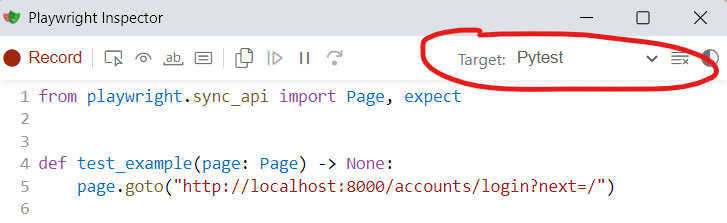
Code generation window opened with playwright codegen http://localhost:8000
Do not save the generated script as-is — codegen output is a flat script with hardcoded values and raw locators. Extract the relevant locators/actions into a page object and constants, and drive it from a fixture instead.
Debugging fixture setup failures
Playwright’s built-in --tracing only covers the test itself — if a fixture’s setup steps fail before the test runs, there’s nothing to
debug. Use setup_context (utils.py) when writing fixture setup that drives the browser (e.g. publishing a document before a test
runs). It wraps the browser context in its own tracing, and saves a trace to test-results/fixture-setup/{label}.zip only when the setup
block raises — on success the trace is discarded.
with setup_context(browser, "publish-document", storage_state=auth_state) as page:
    ...
Tests fail on unexpected browser console errors
The autouse fail_on_console_errors fixture (conftest.py) fails any test that emits a console.error in the browser, even if the
error is unrelated to what the test is asserting. This has caught real front-end bugs, but it also means a test can fail for reasons that have
nothing to do with its own logic. A small allow-list of known-noisy messages (e.g. CSP report-only violations, static file 404s, HTMX abort
errors from runserver) is already filtered out in the fixture. If you hit a new, confirmed-benign console error, extend that allow-list
rather than working around it in individual tests.
Prefer the API client for setting up test data
api_client.py provides APIClient, a thin wrapper around Playwright’s APIRequestContext for authenticated REST calls. The
session-scoped api_client fixture logs in once and is reused across tests. When a test only needs a submission/observation to exist (and
isn’t testing the submission UI itself), create it through api_client instead of driving the whole form through the browser — it’s faster
and avoids coupling unrelated tests to the submission form’s own conditional logic bugs.
Running Tests
Locally, via docker compose
Bring up the dev stack, then run the playwright service against it (it’s behind a playwright profile, but naming it explicitly runs it
regardless):
docker-compose up -d
docker-compose up playwright --build
You can also target specific test files or directories:
docker-compose run playwright pytest tests/test_login_failed.py
Locally, without docker
With dependencies installed (see Installation above) and an instance of mat-cms running, set BROWSER_HOST if it isn’t http://localhost:8000, then run pytest directly from integration_tests:
cd integration_tests
pytest tests/test_login_failed.py
Markers
external_apimarks tests that call third-party APIs. CI excludes these by default (-m "not external_api").
In CI
The integration-tests:test job (ci/.gitlab-ci.integration-tests.yml) runs against the cms and celery-worker services,
split across parallel groups with pytest-split. It runs with --tracing=retain-on-failure and publishes an HTML report
(playwright-report/index.html) plus test-results/ as job artifacts, so a failing run can be debugged without reproducing it locally.
JavaScript Tests
This project uses Jest to test JavaScript code
Set-up
Before you can run tests, you need to install nodejs and jest.
npm install
Writing tests
Tests should be added to
js_tests/tests/app/folder, where{app}is the name of the django app where the js file is located.File name should match tested file name, but ending with .test.js
Any third party libraries referenced in the tested code should either be:
mocked
or included from local source (instead of being installed using
npm)
Running tests
By default, test will run automatically in CI, but during development you should run the tests locally using one of the available methods
In terminal
In the project’s root directory run npm test command.
To pass additional arguments to Jest, you need to add -- separator. e.g.:
npm test -- js_tests/tests/megforms.test.js
In PyCharm
PyCharm Supports Jest tests.
You can create a run configuration for Jest pointing at the project’s root directory and run the tests in the IDE.
This allows you to debug tests by stepping through js code, and inspect variables.
Using docker compose
Run the jest service in docker. It mounts the project in an NPM environment and runs the tests.
`shell
docker compose up jest
`