WSGI Server
- WSGI
The Web Server Gateway Interface (WSGI, pronounced whiskey or WIZ-ghee) is a simple calling convention for web servers to forward requests to web applications or frameworks written in the Python programming language. source
WSGI server is the web server passing requests to django. The sh/wsgi.sh script runs mod_wsgi-express start-server.
The meg_forms/wsgi.py script is the entry point from WSGI to Django application.
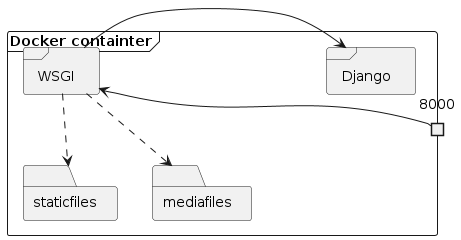
Web server relation to django app. The web server can be configured to serve files directly, such as static and media files.
See also
WSGI server documentation
WSGI express reference
The mod_wsgi-express script accepts the following options
Note
The arguments below are a snapshot from mod-wsgi version 4.9. To get the most up to date reference, run mod_wsgi-express start-server --help.
--application-type TYPE
The type of WSGI application entry point that was
provided. Defaults to 'script', indicating the
traditional mod_wsgi style WSGI script file specified
by a filesystem path. Alternatively one can supply
'module', indicating that the provided entry point is
a Python module which should be imported using the
standard Python import mechanism, or 'paste'
indicating that the provided entry point is a Paste
deployment configuration file. If you want to just use
the server to host static files only, then you can
also instead supply 'static' with the target being the
directory containing the files to server or the
current directory if none is supplied.
--entry-point FILE-PATH|MODULE
The file system path or module name identifying the
file which contains the WSGI application entry point.
How the value given is interpreted depends on the
corresponding type identified using the '--
application-type' option. Use of this option is the
same as if the value had been given as argument but
without any option specifier. A named option is also
provided so as to make it clearer in a long option
list what the entry point actually is. If both methods
are used, that specified by this option will take
precedence.
--host IP-ADDRESS The specific host (IP address) interface on which
requests are to be accepted. Defaults to listening on
all host interfaces.
--port NUMBER The specific port to bind to and on which requests are
to be accepted. Defaults to port 8000.
--http2 Flag indicating whether HTTP/2 should be
enabled.Requires the mod_http2 module to be available.
--https-port NUMBER The specific port to bind to and on which secure
requests are to be accepted.
--ssl-certificate-file FILE-PATH
Specify the path to the SSL certificate file.
--ssl-certificate-key-file FILE-PATH
Specify the path to the private key file corresponding
to the SSL certificate file.
--ssl-certificate FILE-PATH
Specify the common path to the SSL certificate files.
This is a convenience function so that only one option
is required to specify the location of the certificate
file and the private key file. It is expected that the
files have '.crt' and '.key' extensions. This option
should refer to the common part of the names for both
files which appears before the extension.
--ssl-ca-certificate-file FILE-PATH
Specify the path to the file with the CA certificates
to be used for client authentication. When specified,
access to the whole site will by default require
client authentication. To require client
authentication for only parts of the site, use the
--ssl-verify-client option.
--ssl-verify-client URL-PATH
Specify a sub URL of the site for which client
authentication is required. When this option is
specified, the default of client authentication being
required for the whole site will be disabled and
verification will only be required for the specified
sub URL.
--ssl-certificate-chain-file FILE-PATH
Specify the path to a file containing the certificates
of Certification Authorities (CA) which form the
certificate chain of the server certificate.
--ssl-environment Flag indicating whether the standard set of SSL
related variables are passed in the per request
environment passed to a handler.
--https-only Flag indicating whether any requests made using a HTTP
request over the non secure connection should be
redirected automatically to use a HTTPS request over
the secure connection.
--hsts-policy PARAMS Specify the HSTS policy that should be applied when
HTTPS only connections are being enforced.
--server-name HOSTNAME
The primary host name of the web server. If this name
starts with 'www.' then an automatic redirection from
the parent domain name to the 'www.' server name will
created.
--server-alias HOSTNAME
A secondary host name for the web server. May include
wildcard patterns.
--allow-localhost Flag indicating whether access via localhost should
still be allowed when a server name has been specified
and a name based virtual host has been configured.
--processes NUMBER The number of worker processes (instances of the WSGI
application) to be started up and which will handle
requests concurrently. Defaults to a single process.
--threads NUMBER The number of threads in the request thread pool of
each process for handling requests. Defaults to 5 in
each process. Note that if embedded mode and only
prefork MPM is available, then processes will instead
be used.
--max-clients NUMBER The maximum number of simultaneous client connections
that will be accepted. This will default to being 1.5
times the total number of threads in the request
thread pools across all process handling requests.
Note that if embedded mode is used this will be
ignored.
--initial-workers NUMBER
The initial number of workers to create on startup
expressed as a percentage of the maximum number of
clients. The value provided should be between 0 and 1.
The default is dependent on the type of MPM being
used. Note that if embedded mode is used, this will be
ignored.
--minimum-spare-workers NUMBER
The minimum number of spare workers to maintain
expressed as a percentage of the maximum number of
clients. The value provided should be between 0 and 1.
The default is dependent on the type of MPM being
used. Note that if embedded mode is used, this will be
ignored.
--maximum-spare-workers NUMBER
The maximum number of spare workers to maintain
expressed as a percentage of the maximum number of
clients. The value provided should be between 0 and 1.
The default is dependent on the type of MPM being
used. Note that if embedded mode is used, this will be
ignored.
--limit-request-body NUMBER
The maximum number of bytes which are allowed in a
request body. Defaults to 10485760 (10MB).
--maximum-requests NUMBER
The number of requests after which any one worker
process will be restarted and the WSGI application
reloaded. Defaults to 0, indicating that the worker
process should never be restarted based on the number
of requests received.
--startup-timeout SECONDS
Maximum number of seconds allowed to pass waiting for
the application to be successfully loaded and started
by a worker process. When this timeout has been
reached without the application having been
successfully loaded and started, the worker process
will be forced to restart. Defaults to 15 seconds.
--shutdown-timeout SECONDS
Maximum number of seconds allowed to pass when waiting
for a worker process to shutdown as a result of the
maximum number of requests or inactivity timeout being
reached, or when a user initiated SIGINT signal is
sent to a worker process. When this timeout has been
reached the worker process will be forced to exit even
if there are still active requests or it is still
running Python exit functions. Defaults to 5 seconds.
--restart-interval SECONDS
Number of seconds between worker process restarts. If
graceful timeout is also specified, active requests
will be given a chance to complete before the process
is forced to exit and restart. Not enabled by default.
--cpu-time-limit SECONDS
Number of seconds of CPU time the process can use
before it will be restarted. If graceful timeout is
also specified, active requests will be given a chance
to complete before the process is forced to exit and
restart. Not enabled by default.
--graceful-timeout SECONDS
Grace period for requests to complete normally, while
still accepting new requests, when worker processes
are being shutdown and restarted due to maximum
requests being reached or restart interval having
expired. Defaults to 15 seconds.
--eviction-timeout SECONDS
Grace period for requests to complete normally, while
still accepting new requests, when the WSGI
application is being evicted from the worker
processes, and the process restarted, due to forced
graceful restart signal. Defaults to timeout specified
by '--graceful-timeout' option.
--deadlock-timeout SECONDS
Maximum number of seconds allowed to pass before the
worker process is forcibly shutdown and restarted
after a potential deadlock on the Python GIL has been
detected. Defaults to 60 seconds.
--inactivity-timeout SECONDS
Maximum number of seconds allowed to pass before the
worker process is shutdown and restarted when the
worker process has entered an idle state and is no
longer receiving new requests. Not enabled by default.
--ignore-activity URL-PATH
Specify the URL path for any location where activity
should be ignored when the '--activity-timeout' option
is used. This would be used on health check URLs so
that health checks do not prevent process restarts due
to inactivity.
--request-timeout SECONDS
Maximum number of seconds allowed to pass before the
worker process is forcibly shutdown and restarted when
a request does not complete in the expected time. In a
multi threaded worker, the request time is calculated
as an average across all request threads. Defaults to
60 seconds.
--connect-timeout SECONDS
Maximum number of seconds allowed to pass before
giving up on attempting to get a connection to the
worker process from the Apache child process which
accepted the request. This comes into play when the
worker listener backlog limit is exceeded. Defaults to
15 seconds.
--socket-timeout SECONDS
Maximum number of seconds allowed to pass before
timing out on a read or write operation on a socket
and aborting the request. Defaults to 60 seconds.
--queue-timeout SECONDS
Maximum number of seconds allowed for a request to be
accepted by a worker process to be handled, taken from
the time when the Apache child process originally
accepted the request. Defaults to 45 seconds.
--header-timeout SECONDS
The number of seconds allowed for receiving the
request including the headers. This may be dynamically
increased if a minimum rate for reading the request
and headers is also specified, up to any limit imposed
by a maximum header timeout. Defaults to 15 seconds.
--header-max-timeout SECONDS
Maximum number of seconds allowed for receiving the
request including the headers. This is the hard limit
after taking into consideration and increases to the
basic timeout due to minimum rate for reading the
request and headers which may be specified. Defaults
to 30 seconds.
--header-min-rate BYTES
The number of bytes required to be sent as part of the
request and headers to trigger a dynamic increase in
the timeout on receiving the request including
headers. Each time this number of bytes is received
the timeout will be increased by 1 second up to any
maximum specified by the maximum header timeout.
Defaults to 500 bytes.
--body-timeout SECONDS
The number of seconds allowed for receiving the
request body. This may be dynamically increased if a
minimum rate for reading the request body is also
specified, up to any limit imposed by a maximum body
timeout. Defaults to 15 seconds.
--body-max-timeout SECONDS
Maximum number of seconds allowed for receiving the
request body. This is the hard limit after taking into
consideration and increases to the basic timeout due
to minimum rate for reading the request body which may
be specified. Defaults to 0 indicating there is no
maximum.
--body-min-rate BYTES
The number of bytes required to be sent as part of the
request body to trigger a dynamic increase in the
timeout on receiving the request body. Each time this
number of bytes is received the timeout will be
increased by 1 second up to any maximum specified by
the maximum body timeout. Defaults to 500 bytes.
--server-backlog NUMBER
Depth of server socket listener backlog for Apache
child processes. Defaults to 500.
--daemon-backlog NUMBER
Depth of server socket listener backlog for daemon
processes. Defaults to 100.
--send-buffer-size NUMBER
Size of socket buffer for sending data to daemon
processes. Defaults to 0, indicating the system
default socket buffer size is used.
--receive-buffer-size NUMBER
Size of socket buffer for receiving data from daemon
processes. Defaults to 0, indicating the system
default socket buffer size is used.
--header-buffer-size NUMBER
Size of buffer used for reading response headers from
daemon processes. Defaults to 0, indicating internal
default of 32768 bytes is used.
--response-buffer-size NUMBER
Maximum amount of response content that will be
allowed to be buffered in the Apache child worker
process when proxying the response from a daemon
process. Defaults to 0, indicating internal default of
65536 bytes is used.
--response-socket-timeout SECONDS
Maximum number of seconds allowed to pass before
timing out on a write operation back to the HTTP
client when the response buffer has filled and data is
being forcibly flushed. Defaults to 0 seconds
indicating that it will default to the value of the
'socket-timeout' option.
--enable-sendfile Flag indicating whether sendfile() support should be
enabled. Defaults to being disabled. This should only
be enabled if the operating system kernel and file
system type where files are hosted supports it.
--disable-reloading Disables all reloading of daemon processes due to
changes to the file containing the WSGI application
entrypoint, or any other loaded source files. This has
no effect when embedded mode is used as reloading is
automatically disabled for embedded mode.
--reload-on-changes Flag indicating whether worker processes should be
automatically restarted when any Python code file
loaded by the WSGI application has been modified.
Defaults to being disabled. When reloading on any code
changes is disabled, unless all reloading is also
disabled, the worker processes will still though be
reloaded if the file containing the WSGI application
entrypoint is modified.
--user USERNAME When being run by the root user, the user that the
WSGI application should be run as.
--group GROUP When being run by the root user, the group that the
WSGI application should be run as.
--callable-object NAME
The name of the entry point for the WSGI application
within the WSGI script file. Defaults to the name
'application'.
--map-head-to-get OFF|ON|AUTO
Flag indicating whether HEAD requests should be mapped
to a GET request. By default a HEAD request will be
automatically mapped to a GET request when an Apache
output filter is detected that may want to see the
entire response in order to set up response headers
correctly for a HEAD request. This can be disable by
setting to 'Off'.
--document-root DIRECTORY-PATH
The directory which should be used as the document
root and which contains any static files.
--directory-index FILE-NAME
The name of a directory index resource to be found in
the document root directory. Requests mapping to the
directory will be mapped to this resource rather than
being passed through to the WSGI application.
--directory-listing Flag indicating if directory listing should be enabled
where static file application type is being used and
no directory index file has been specified.
--allow-override DIRECTIVE-TYPE
Allow directives to be overridden from a '.htaccess'
file. Defaults to 'None', indicating that any
'.htaccess' file will be ignored with override
directives not being permitted.
--mount-point URL-PATH
The URL path at which the WSGI application will be
mounted. Defaults to being mounted at the root URL of
the site.
--url-alias URL-PATH FILE-PATH|DIRECTORY-PATH
Map a single static file or a directory of static
files to a sub URL.
--error-document STATUS URL-PATH
Map a specific sub URL as the handler for HTTP errors
generated by the web server.
--error-override Flag indicating whether Apache error documents will
override application error responses.
--proxy-mount-point URL-PATH URL
Map a sub URL such that any requests against it will
be proxied to the specified URL. This is only for
proxying to a site as a whole, or a sub site, not
individual resources.
--proxy-virtual-host HOSTNAME URL
Proxy any requests for the specified host name to the
remote URL.
--trust-proxy-header HEADER-NAME
The name of any trusted HTTP header providing details
of the front end client request when proxying.
--trust-proxy IP-ADDRESS/SUBNET
The IP address or subnet corresponding to any trusted
proxy.
--keep-alive-timeout SECONDS
The number of seconds which a client connection will
be kept alive to allow subsequent requests to be made
over the same connection when a keep alive connection
is requested. Defaults to 2, indicating that keep
alive connections are set for 2 seconds.
--compress-responses Flag indicating whether responses for common text
based responses, such as plain text, HTML, XML, CSS
and Javascript should be compressed.
--server-metrics Flag indicating whether internal server metrics will
be available within the WSGI application. Defaults to
being disabled.
--server-status Flag indicating whether web server status will be
available at the /server-status sub URL. Defaults to
being disabled.
--host-access-script SCRIPT-PATH
Specify a Python script file for performing host
access checks.
--auth-user-script SCRIPT-PATH
Specify a Python script file for performing user
authentication.
--auth-type TYPE Specify the type of authentication scheme used when
authenticating users. Defaults to using 'Basic'.
Alternate schemes available are 'Digest'.
--auth-group-script SCRIPT-PATH
Specify a Python script file for performing group
based authorization in conjunction with a user
authentication script.
--auth-group NAME Specify the group which users should be a member of
when using a group based authorization script.
Defaults to 'wsgi' as a place holder but should be
overridden to be the actual group you use rather than
making your group name match the default.
--include-file FILE-PATH
Specify the path to an additional web server
configuration file to be included at the end of the
generated web server configuration file.
--rewrite-rules FILE-PATH
Specify an alternate server configuration file which
contains rewrite rules. Defaults to using the
'rewrite.conf' stored under the server root directory.
--envvars-script FILE-PATH
Specify an alternate script file for user defined web
server environment variables. Defaults to using the
'envvars' stored under the server root directory.
--locale NAME Specify the natural language locale for the process as
normally defined by the 'LC_ALL' environment variable.
If not specified, then the default locale for this
process will be used. If the default locale is however
'C' or 'POSIX' then an attempt will be made to use
either the 'en_US.UTF-8' or 'C.UTF-8' locales and if
that is not possible only then fallback to the default
locale of this process.
--setenv KEY VALUE Specify a name/value pairs to be added to the per
request WSGI environ dictionary
--passenv KEY Specify the names of any process level environment
variables which should be passed as a name/value pair
in the per request WSGI environ dictionary.
--working-directory DIRECTORY-PATH
Specify the directory which should be used as the
current working directory of the WSGI application.
This directory will be searched when importing Python
modules so long as the WSGI application doesn't
subsequently change the current working directory.
Defaults to the directory this script is run from.
--pid-file FILE-PATH Specify an alternate file to be used to store the
process ID for the root process of the web server.
--server-root DIRECTORY-PATH
Specify an alternate directory for where the generated
web server configuration, startup files and logs will
be stored. On Linux defaults to the sub directory
specified by the TMPDIR environment variable, or /tmp
if not specified. On macOS, defaults to the /var/tmp
directory.
--server-mpm NAME Specify preferred MPM to use when using Apache 2.4
with dynamically loadable MPMs and more than one is
available. By default the MPM precedence order when no
preference is given is "event", "worker" and
"prefork".
--log-directory DIRECTORY-PATH
Specify an alternate directory for where the log files
will be stored. Defaults to the server root directory.
--log-level NAME Specify the log level for logging. Defaults to 'warn'.
--access-log Flag indicating whether the web server access log
should be enabled. Defaults to being disabled.
--startup-log Flag indicating whether the web server startup log
should be enabled. Defaults to being disabled.
--log-to-terminal Flag indicating whether logs should be directed back
to the terminal. Defaults to being disabled. If --log-
directory is set explicitly, it will override this
option. If logging to the terminal is carried out, any
rotating of log files will be disabled.
--access-log-format FORMAT
Specify the format of the access log records.
--error-log-format FORMAT
Specify the format of the error log records.
--error-log-name FILE-NAME
Specify the name of the error log file when it is
being written to the log directory.
--access-log-name FILE-NAME
Specify the name of the access log file when it is
being written to the log directory.
--startup-log-name FILE-NAME
Specify the name of the startup log file when it is
being written to the log directory.
--rotate-logs Flag indicating whether log rotation should be
performed.
--max-log-size MB The maximum size in MB the log file should be allowed
to reach before log file rotation is performed.
--rotatelogs-executable FILE-PATH
Override the path to the rotatelogs executable.
--python-path DIRECTORY-PATH
Specify the path to any additional directory that
should be added to the Python module search path. Note
that these directories will not be processed for
'.pth' files. If processing of '.pth' files is
required, set the 'PYTHONPATH' environment variable in
a script specified by the '--envvars-script' option.
--python-eggs DIRECTORY-PATH
Specify an alternate directory which should be used
for unpacking of Python eggs. Defaults to a sub
directory of the server root directory.
--shell-executable FILE-PATH
Override the path to the shell used in the 'apachectl'
script. The 'bash' shell will be used if available.
--httpd-executable FILE-PATH
Override the path to the Apache web server executable.
--process-name NAME Override the name given to the Apache parent process.
This might be needed when a process manager expects
the process to be named a certain way but due to a
sequence of exec calls the name changed.
--modules-directory DIRECTORY-PATH
Override the path to the Apache web server modules
directory.
--mime-types FILE-PATH
Override the path to the mime types file used by the
web server.
--socket-prefix DIRECTORY-PATH
Specify an alternate directory name prefix to be used
for the UNIX domain sockets used by mod_wsgi to
communicate between the Apache child processes and the
daemon processes.
--add-handler EXTENSION SCRIPT-PATH
Specify a WSGI application to be used as a special
handler for any resources matched from the document
root directory with a specific extension type.
--chunked-request Flag indicating whether requests which use chunked
transfer encoding will be accepted.
--with-cgi Flag indicating whether CGI script support should be
enabled. CGI scripts must use the '.cgi' extension and
be executable
--service-script SERVICE SCRIPT-PATH
Specify the name of a Python script to be loaded and
executed in the context of a distinct daemon process.
Used for running a managed service.
--service-user SERVICE USERNAME
When being run by the root user, the user that the
distinct daemon process started to run the managed
service should be run as.
--service-group SERVICE GROUP
When being run by the root user, the group that the
distinct daemon process started to run the managed
service should be run as.
--service-log-file SERVICE FILE-NAME
Specify the name of a separate log file to be used for
the managed service.
--embedded-mode Flag indicating whether to run in embedded mode rather
than the default daemon mode. Numerous daemon mode
specific features will not operate when this mode is
used.
--enable-docs Flag indicating whether the mod_wsgi documentation
should be made available at the /__wsgi__/docs sub
URL.
--debug-mode Flag indicating whether to run in single process mode
to allow the running of an interactive Python
debugger. This will override all options related to
processes, threads and communication with workers. All
forms of source code reloading will also be disabled.
Both stdin and stdout will be attached to the console
to allow interaction with the Python debugger.
--enable-debugger Flag indicating whether post mortem debugging of any
exceptions which propagate out from the WSGI
application when running in debug mode should be
performed. Post mortem debugging is performed using
the Python debugger (pdb).
--debugger-startup Flag indicating whether when post mortem debugging is
enabled, that the debugger should also be thrown into
the interactive console on initial startup of the
server to allow breakpoints to be setup.
--enable-coverage Flag indicating whether coverage analysis is enabled
when running in debug mode.
--coverage-directory DIRECTORY-PATH
Override the path to the directory into which coverage
analysis will be generated when enabled under debug
mode.
--enable-profiler Flag indicating whether code profiling is enabled when
running in debug mode.
--profiler-directory DIRECTORY-PATH
Override the path to the directory into which profiler
data will be written when enabled under debug mode.
--enable-recorder Flag indicating whether recording of requests is
enabled when running in debug mode.
--recorder-directory DIRECTORY-PATH
Override the path to the directory into which recorder
data will be written when enabled under debug mode.
--enable-gdb Flag indicating whether Apache should be run under
'gdb' when running in debug mode. This would be use to
debug process crashes.
--gdb-executable FILE-PATH
Override the path to the gdb executable.
--setup-only Flag indicating that after the configuration files
have been setup, that the command should then exit and
not go on to actually run up the Apache server. This
is to allow for the generation of the configuration
with Apache then later being started separately using
the generated 'apachectl' script.
-h, --help show this help message and exit