Group & Institution levels
Some institutions are a part of a institution group. To enable managing those institutions, and sharing content and users, the system allows some items to be group level.
This generally means that the item belongs to the group rather than individual institution.
The group it belongs to is determined by it’s institution field - the immediate group the institution belongs to, is the group the item belongs to.
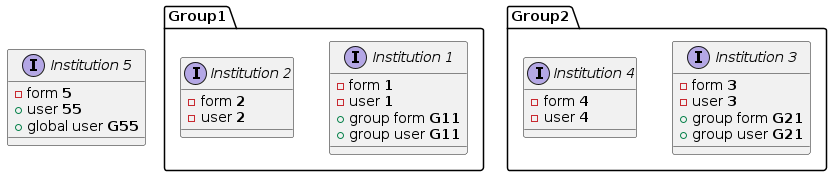
Example institution and group layout showing two groups and one standalone institution (without group)
User levels
A group level auditor has access to all institutions within their group. Their institution relation is used to determine the account’s default locale (language), timezone and password policy.
A group user’s access to individual institutions within their group can be limited by setting restricted_institutions field.
See also
See how data within institutions and groups are ringfenced in Ringfencing.
Global users
The implementation team has global access to all institutions. This gives them access to all institutions in the region.
This is a special level that works only one way - the users can see and access forms, documents, and observations, but do not appear as users in Settings interface, or in any user dropdowns within those institutions.
A user can only be global if they are a part of the `meg-staff institution and have an email address from the megit.com domain.
If somehow a user is assigned the global level and doesn’t meet these criteria, they will be blocked from signing in.
For more information see GLOBAL_INSTITUTION_SLUG.
Form levels
Group level forms are available in all institutions within the group.
Institution level users can access group level forms in the context of their own institution.
This means they can submit that form only to their own institution, and view observations submitted using the form to their own institution only.
Similarly Group level users whose restricted_institutions excludes form’s institution can also access the form.
Note
Institution-level users are restricted from editing group-level forms as per Task #22838
QIP configurations
Group level QipConfig objects are available to all institutions within the group.
They can be set as the config in any of the forms within those institutions, both group and institution level forms.
Document & folder levels
Both documents and folders can be group level.
Group level documents can belong to institution-level folders, however they will not be visible to users who don’t have access to the folder, effectively making the document institution-level.
Institution level documents are inaccessible outside of their institution even if placed in a group-level folder.
Folder accessible institutions
Group-level folders can optionally restrict access to specific institutions within the group using the accessible_institutions field.
When no institutions are selected, the folder is accessible to all institutions in the group (default behaviour). When one or more institutions are selected, only users from those institutions can access the folder and its documents.
The accessible_institutions field is automatically hidden when the folder level is set to Institution, and any previously selected institutions are cleared when switching from Group to Institution level.
Parent-child constraint
When a parent folder has accessible_institutions set, a child folder can only select from the parent’s restricted institutions.
This is enforced both client-side (the dropdown is dynamically filtered via AJAX when the parent changes) and server-side (form validation rejects institutions outside the parent’s set).
If the parent folder has no restriction (empty accessible_institutions), the child can choose from all published institutions in the group.
If the child leaves accessible_institutions empty while the parent has restrictions, the parent’s institutions are automatically inherited — a child folder cannot have wider access than its parent.
At query time, each folder’s accessible_institutions is still evaluated independently — the constraint is enforced at creation/edit time to maintain a logical hierarchy.
See also
More details in Documents & Folders ringfencing
Team levels
Group level teams allow users from multiple institutions within the institution group belong to the same team.
Institution-level teams can be joined by both institution and group-level users.
Tag Groups
Group level TagGroup objects make the tags available to forms in all institutions within the group.
SSO identity provider level
Identity providers (SAML) for SSO can be set-up on institution and group level. A group level identity provider allows all users within the institution group to authenticate against the same Active Directory (or other provider).
Note
All new user accounts created via SAML will be associated with whatever institution is set in institution.
To avoid this, the accounts can be pre-emptively created in the desired institution.
See also
More about SAML in Single Sign-On documentation
Security Policy
Group level PasswordPolicy objects make the security policy available to users in all institutions within the group.
You can use the policy level field to configure this.
Not to be confused with the user level field, which is used to determine the level of users that a security policy will apply to.
Report Rule
A report rule can be institution or group level. Institution level rules can only send notifications that are relevant to locations from the institution of the report rule. Group level rules can send notifications that are relevant to locations and forms from across the institution group.