Insights
Insights module was initially created to implement in Task #26830 “MEG Smart alerts”.
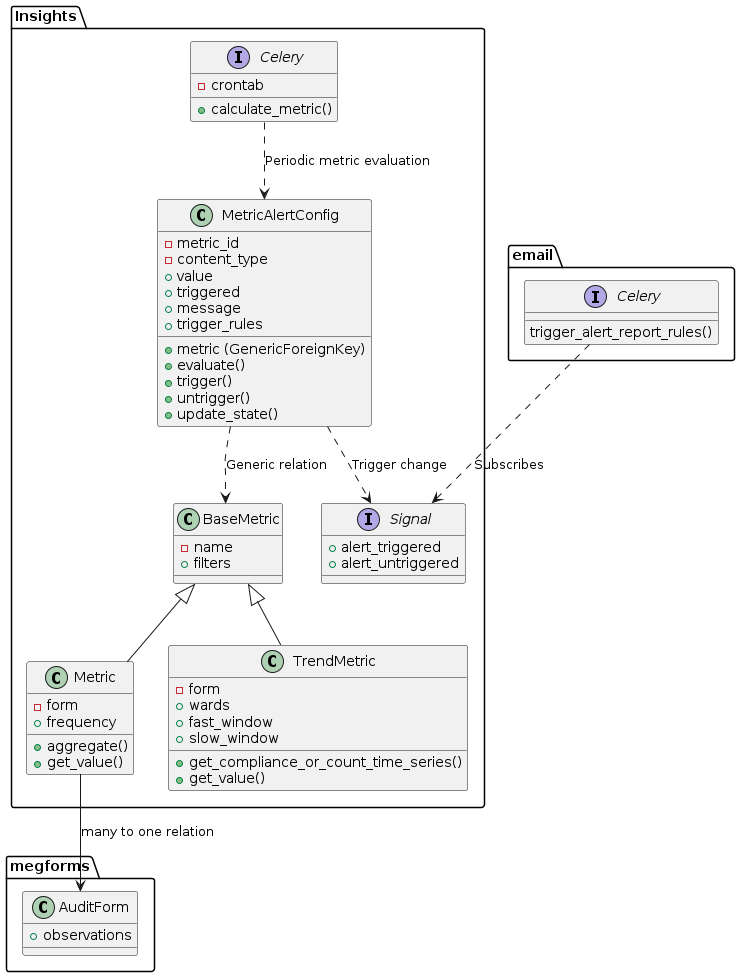
Updated Insights module integration with megforms and emails
Glossary
- aggregation
A method of consolidating multiple values into a single value.
For example “min” aggregation method returns only the lowest value, and “avg” is an average of multiple values.
- metric
Defines a value to track within a form (compliance, or count of observations), how often to sample and how to aggregate the values.
For example: “Minimum compliance” metric would define “compliance” as the field, and “min” as the aggregation method.
Metric is represented by
Metricmodel.- metric alert
defines an action to be performed (notification e-mail) when metric exceeds a predefined
value.- trend metric
Also defines a value to track within a form (compliance, or count of observations). However here a time series of compliance or count values is created as well as moving averages. These moving averages are used to return the magnitude of the current trend, returned in get_value.
If get_value returns > 0 the data is in an uptrend, with higher values meaning a larger trend (a value of 1 meaning fast moving average is 100% above the slow moving average). if get_value returns < 0 the data is in a down trend.
Example use - On ward 10 falls have been trending upwards, take action.
Trend metric is represented by
TrendMetricmodel.
Modules
Models
- class insights.models.MetricQuerySet(model=None, query=None, using=None, hints=None)
- with_alerts() MetricQuerySet
Only metrics having active alerts
- class insights.models.BaseMetric(*args, **kwargs)
Base class of all metrics, each subclass implements
get_value()method to get its value at any point in time. An object of a BaseMetric subclass can have any number of alerts defined byMetricAlertConfig.- classmethod get_metric(metric_id: int, model_label: str) BaseMetric
Gets a specific metric instance by ID and model type.
- Parameters:
metric_id – The ID of the metric to retrieve
model_label – The app_label.model_name string identifying the metric type
- Returns:
The specific metric instance
- classmethod get_metrics_with_alerts_and_types() Iterator[tuple[BaseMetric, str]]
Returns an iterator of tuples containing (metric, model_label) for all metrics that have alerts configured.
- Returns:
Iterator[Tuple[BaseMetric, str]]: Iterator of (metric obj, “app_label.model_name”) pairs
- get_next_time(now: datetime | None = None) datetime
Datetime of the next exact time when this metric should be re-calculated.
- get_observations(observations: CustomObservationQuerySet | None = None, dt: datetime | None = None) CustomObservationQuerySet
Observations that met the metric’s criteria; empty for metrics not derived from discrete observations (e.g. trend metrics built from a time series).
- class insights.models.Metric(*args, **kwargs)
Represents a metric Aggregates data over a time period to a single value, this is provided in get_value and can be used for alerts.
- clean()
Hook for doing any extra model-wide validation after clean() has been called on every field by self.clean_fields. Any ValidationError raised by this method will not be associated with a particular field; it will have a special-case association with the field defined by NON_FIELD_ERRORS.
- aggregate(values: Iterable[float | None]) float | None
Aggregates multiple values into one according to the metric’s aggregation method
- get_value_date_range(dt: datetime | None = None) tuple[datetime, datetime]
Get date range for get_value observation filter
- Parameters:
dt – Optional datetime
- Returns:
date range tuple of start and end date
- get_observations(observations: CustomObservationQuerySet | None = None, dt: datetime | None = None) CustomObservationQuerySet
Observations contributing to this metric’s value for the given date/time, after applying the time range and configured filters.
- exception DoesNotExist
- exception MultipleObjectsReturned
- class insights.models.TrendMetric(*args, **kwargs)
Creates time series with smoothing & moving averages to compute up and down-trends. The trend magnitude is provided by get_value and can be used for alerts.
- clean()
Hook for doing any extra model-wide validation after clean() has been called on every field by self.clean_fields. Any ValidationError raised by this method will not be associated with a particular field; it will have a special-case association with the field defined by NON_FIELD_ERRORS.
- exception DoesNotExist
- exception MultipleObjectsReturned
- class insights.models.MetricAlertConfigQuerySet(model=None, query=None, using=None, hints=None)
- class insights.models.MetricAlertConfig(*args, **kwargs)
Defines alert triggered when a metric exceeds a defined threshold.
Metric alerts are re-evaluated regularily by
calculate_metrics(), and alert action is performed the first time the threshold value is exceeded.- evaluate(value: float | None) bool | None
Evaluates whether given threshold triggers the metric alert
- Parameters:
value – metric value to evaluate
- Returns:
Trueif alert is triggered, orNoneif state cannot be evaluated (input value is null)
- trigger(save: bool = False, value: float | None = None, entries: CustomObservationQuerySet | None = None) bool
Triggers the alert; checks current status, if it’s already triggered no action will be performed, but if alert was not yet triggered, triggers the alert action.
- Parameters:
save – whether to persist the updated triggered state immediately
value – metric value that caused the trigger, forwarded to the
alert_triggeredsignalentries – observations matching the alert criteria, forwarded to the
alert_triggeredsignal
- untrigger(save=False) bool
Sets alert action as non-triggered
- update_state(trigger: bool | None, value: float | None = None, entries: CustomObservationQuerySet | None = None) bool
Given new state, invokes trigger/untrigger method. Returns True if trigger state has changed
- clean()
Hook for doing any extra model-wide validation after clean() has been called on every field by self.clean_fields. Any ValidationError raised by this method will not be associated with a particular field; it will have a special-case association with the field defined by NON_FIELD_ERRORS.
- exception DoesNotExist
- exception MultipleObjectsReturned
- class insights.models.AlertQuerySet(model=None, query=None, using=None, hints=None)
- class insights.models.Alert(*args, **kwargs)
A record of a single metric alert activation, stored whenever a smart alert fires.
Captures the metric value that crossed the threshold, the window during which the alert remained active, and the observations that met the alert criteria.
- exception DoesNotExist
- exception MultipleObjectsReturned
Utils
- insights.utils.schedule_metric_calculation(metric: BaseMetric) PeriodicTask
Schedules once-off metric calculation in celery for the next scheduling instance
- insights.utils.get_metric_schedules(metric: BaseMetric) QuerySet[PeriodicTask]
Gets
PeriodicTaskqueryset for given metric
- insights.utils.get_compliance_or_count_time_series(form: AuditForm, field: Literal['_count', '_compliance'], translated_field: str, granularity: Granularity | int, series_start_date: datetime | None = None, wards: WardQuerySet | list[Ward] | None = None, observations: CustomObservationQuerySet | None = None, dt: datetime | None = None, filters: dict[str, str | int | bool | list | float | None] | None = None) DataFrame
Calculate time series data for observation counts or compliance scores.
- Parameters:
form – AuditForm instance containing compliance rules
field – Metric type to calculate (‘_count’ or ‘_compliance’)
translated_field – Human-readable field name for error messages
granularity – Time series grouping (Granularity.day for daily, Granularity.week for weekly)
series_start_date – Optional start date to filter observations
wards – Optional QuerySet of wards to filter observations
observations – QuerySet of observations to analyze
dt – filter for observations by session end time
filters – extra filters for filtering observations to make time series
- Returns:
DataFrame with columns ‘date’ and ‘value’, where value is either count of observations or mean compliance score per time period
- insights.utils.get_data_difference_magnitude(timeseries: DataFrame, comparison_var_name: str, base_var_name: str, result_name: str, weighting: float = 1) DataFrame
Calculate the normalized difference between two timeseries values, scaled between -1 and 1.
- Parameters:
timeseries – DataFrame containing the input data
comparison_var_name – Column name for the value to compare
base_var_name – Column name for the base reference value
result_name – Column name to store the result
weighting – Multiplier to scale the magnitude of the difference (default: 1)
- Returns:
DataFrame with added column containing normalized difference
- insights.utils.auto_trend_select_moving_averages(num_entries: int, base_fast: int = 2, base_medium: int = 4, base_slow: int = 7, rate: float = 0.05) list[int]
Calculate adaptive moving average periods based on number of data entries.
- Parameters:
num_entries – Number of data points to analyze
base_fast – Base period for fast moving average (default: 2)
base_medium – Base period for medium moving average (default: 4)
base_slow – Base period for slow moving average (default: 7)
rate – Growth rate for moving average periods (default: 0.05)
- Returns:
List of [fast, medium, slow] moving average periods, scaled based on data size
- insights.utils.auto_trend_add_moving_averages(timeseries: DataFrame, smoothing: int | None = None) DataFrame
Optionally apply time series smoothing then calculate moving averages for trend analysis.
- Parameters:
timeseries – DataFrame with ‘value’ column containing time series data
smoothing – Window length for Savitzky-Golay filter smoothing (values: 0,3,7,14)
- Returns:
DataFrame with added columns for moving averages (ma_fast, ma_medium, ma_slow) and crossover signals
- insights.utils.add_moving_averages(timeseries: DataFrame, fast_window: int | None = None, slow_window: int | None = None, smoothing: int | None = None) DataFrame
Add moving averages to time series data, either automatically or with specified windows.
- Parameters:
timeseries – DataFrame with ‘value’ column containing time series data
fast_window – Window size for fast moving average
slow_window – Window size for slow moving average
smoothing – Window length for Savitzky-Golay filter smoothing
- Returns:
DataFrame with added moving averages and crossover signal
- Raises:
ValueError – If only one of fast_window or slow_window is provided
- insights.utils.validate_trend_params(fast_window: int | None, slow_window: int | None, series_start_date: datetime | None = None) None
Validate trend metric parameters for window sizes and date ranges.
- Parameters:
fast_window – Window size for fast moving average (2-100)
slow_window – Window size for slow moving average (10-200)
series_start_date – Start date for time series data
- Raises:
ValidationError – If parameters are invalid
- insights.utils.validate_alert_params(operator_fn: str, value: float) None
Validate alert operator_fn and threshold value combinations.
- Parameters:
operator_fn – Alert operator_fn, on of ‘<’, ‘>’, ‘<=’, ‘>=’
value – Threshold value to trigger alert
- Raises:
ValidationError – If value is invalid for given operator_fn
Celery tasks
- (celery task)insights.tasks.calculate_metrics(now=False) 'int'
Spawns subtask for each metric that has alerts setup. Delays sub-tasks until scheduled time if now=False (default) Triggers sub-tasks immediately if now=True
- (celery task)insights.tasks.calculate_metric(metric_id: 'int', model_label: 'str') 'int'
Calculates given metric and updates its triggers.
- Parameters:
metric_id – ID of the metric to calculate
model_label – The app_label.model_name string identifying the metric type