Messaging
E-mails
E-mail messages are handled using SendGrid by default or an SMTP server in production.
- SendGrid configuration
To use Sendgrid as the mail client these env variables must be used:
EMAIL_BACKEND='sendgrid_backend.SendgridBackend'SENDGRID_API_KEY='<SENDGRID_API_KEY>'
- SMTP Server Configuration
To use a dedicated SMTP server as the mail client these env variables must be used:
EMAIL_BACKEND='django.core.mail.backends.smtp.EmailBackend'EMAIL_HOST='smtp.megit.com'EMAIL_PORT='465'EMAIL_HOST_USER='noreply@megit.com'EMAIL_HOST_PASSWORD='password'EMAIL_USE_TLS=FalseEMAIL_USE_SSL=FalseEMAIL_TIMEOUT=60
- SMTP Server Configuration via django admin
It is possible to configure the SMTP server via django admin. The following env variable must be used:
EMAIL_BACKEND='emails.backends.CustomSMTPBackend'You can then configure the SMTP server in django admin /meg-admin/emails/customsmtpbackendconfig. It is possible to add multiple custom smtp backends via this model, but only one will be used for sending e-mail. The config with the lowest ‘order’ will be chosen.
In development all e-mails are printed to console.
To use sendgrid in development, set EMAIL_BACKEND variable to 'sendgrid_backend.SendgridBackend'.
Sending e-mails
To send e-mail, use emails.utils.send_mail_template utility function. This method sends out e-mail message as rich and plain text, so both html and txt templates are needed.
Locale should be supplied to translate all lazy strings within subject and e-mail body.
Alternatively, send_simple_mail can be used to send a simple e-mail message to user without building bespoke template.
E-mails sent this way can contain text and a list of links.
Receiving e-mails
Ability to handle received e-mail is possible with SendGrid using inbound parse webhook.
Received e-mails are received by SendgridWebhookView and can be handled by connecting to email_received signal.
def on_email_received(sender, *, email: EmailMessage, **kwargs):
    print(f"Received e-mail from {email.from_email}: {email.subject}")
Note
The receiver will be triggered for every e-mail and must implement a way to filter-out irrelevant e-mails or spam.
See also
Setup process to configure inbound parse is documented in Set-up observation e-mail
More details in the original Task #26421.
Push Messages
Push messages are handled by Urbanairship. Implemented in Task #25879.
The messages can be received by client app or the eGuide app, but the way they are set-up is different.
Client app
Client app push message functionality was implemented in Task #24429.
To send a push-message to client app, use send_user_push_message() utility method.
API keys are defined by URBANAIRSHIP_APP_KEY and URBANAIRSHIP_MASTER_SECRET.
Test notification can be triggered by sending an Instant Messaging message to the user. The client app uses hardcoded keys when targeting staging or production. When targeting local test server, it does not define keys and cannot receive messages.
eGuide apps
eGuide apps define their own API keys and can be managed in admin. Admin provides the option to send a test push message to a single device (Channel ID in “About app” screen).
Instant Messaging
Messaging can be set-up per institution by creating an InstitutionMessagingConfig object.
This enables the users ability to send and receive messages between user and other users or receive system messages.
Messages can be sent to user with send_system_message(). To send a templated message, similar to e-mail, use send_system_message_template().
Sending a message triggers a push notification on user’s device.
- messaging.messaging.send_system_message(to: User, message: str, format='plaintext') Message
Sends a system message to user. Creates a new private channel if one does not exists. If channel exists, the message is appended to the channel.
- Parameters:
to – message recipient
message – message contents in plain text; can contain HTML tags if
format=MESSAGE_FORMAT_HTMLformat – message format; by default it is plain text, so the message will be displayed verbatim, but it is possible to allow html formatting (typically used for system messages rather than user to user)
- messaging.messaging.send_system_message_template(to: User, template_name: str, context: dict, format: str = 'plaintext')
Sends a system message based on a template. The template needs to be located in email_extras and have a .txt and .html version. This is similar logic to the one used by e-mail templating
This function wraps
messaging.messaging.send_system_message()by reading message from template before invoking it.- Parameters:
to – message recipient
template_name – name of the template file, needs to be located in
email_extrasfolder in the project. The file extension depends onformat: either txt or html.context – context variables to be passed into the template
format – message format. Use plain to read template from txt file, or html to read from html file.
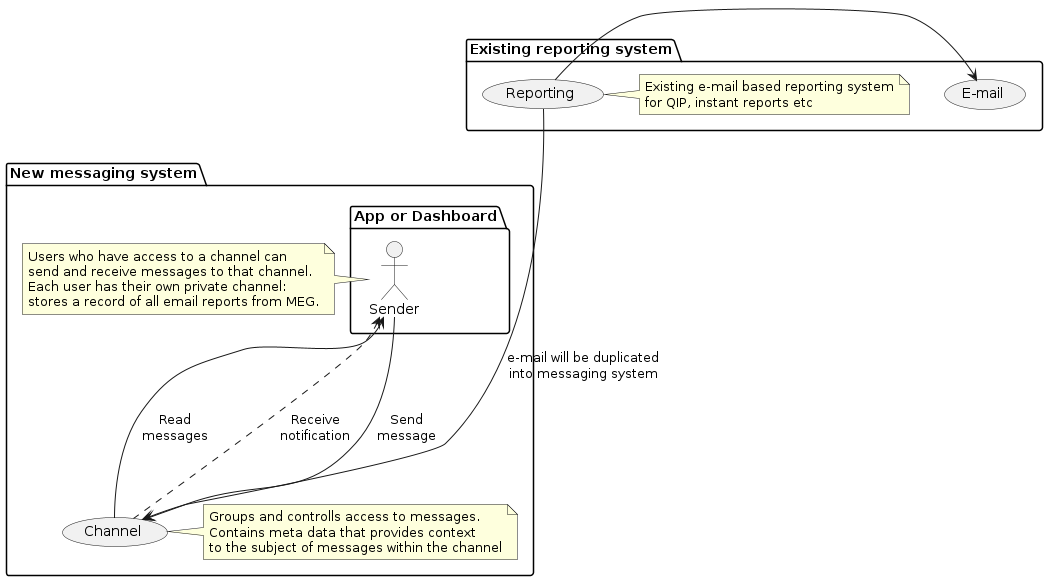
Overview diagram of the messaging system
SMS/Phone call
SMS and phone calls are handled by Twilio. Use TwilioClient to send messages to user’s phone.
- megforms.notifications.twilio.get_localized_message(msg: str, language: str) str
Get the localized message to be dictated
- Parameters:
msg – The message content as a lazy string.
language – The language to translate the content into.
- Returns:
The localized message content.
- class megforms.notifications.twilio.TwilioClient
Wrapper for twilio client. Adds i18n layer to sent messages.
- make_call(to: str, language: str, voice_msg: str, twilio_id: str = '+15005550006')
Make Phone call to a specific mobile number dictating a specific message
- Parameters:
language – language to speak with, <b>NOTE</b> Romanian is not supported
to – phone number to call
voice_msg – text message to dictate
twilio_id – available twilio id
- send_sms(to: str, language: str, msg: str, twilio_id: str = '+15005550006')
Send an SMS to a specific mobile number
- Parameters:
to – phone number to send an sms to
language – language to speak with, <b>NOTE</b> Romanian is not supported
msg – text message to send
twilio_id – twilio id of the phone number to send
- megforms.notifications.twilio.twilio_client = <megforms.notifications.twilio.TwilioClient object>
Singleton Twilio client instance
- (celery task)megforms.notifications.twilio_notification.make_phone_call(auditor_id: int)
Sends predefined message to user by making a phone call and reading it out loud by speech to text
- (celery task)megforms.notifications.twilio_notification.send_phone_sms_predefined(auditor_id: int, note: str | None = None) None
Sends predefined text message to user.
- Parameters:
auditor_id – The id of the auditor who will receive the sms.
note – An optional note to add to the predefined message content.
- (celery task)megforms.notifications.twilio_notification.send_phone_sms(auditor_id: int, content: str) None
Sends a text message to user.
- Parameters:
auditor_id – The id of the auditor who will receive the sms.
content – The content of the sms.
- (celery task)megforms.notifications.twilio_notification.send_sms_to_number(phone_number: str, language: str, content: str, twilio_id: str = '+15005550006') None
Sends a text message to a phone number.
- Parameters:
phone_number – The phone number that will receive the sms.
language – The language.
content – The content of the sms.
twilio_id – The id of the twilio number.