Compliance
Storing compliance
Compliance is stored in ObservationCompliance model. It has references to the form,
observation and contains its overall compliance as well as json structure breaking the compliance by
subform and question so it can be re-computed based by those parameters without re-extracting compliance from individual answers.
Per-instance subform compliance is stored in SubformCompliance, with a foreign key
to ObservationCompliance. Each row represents one instance of a subform on a single
observation, with its resolved compliance score and effective weight. See Subform Compliance.
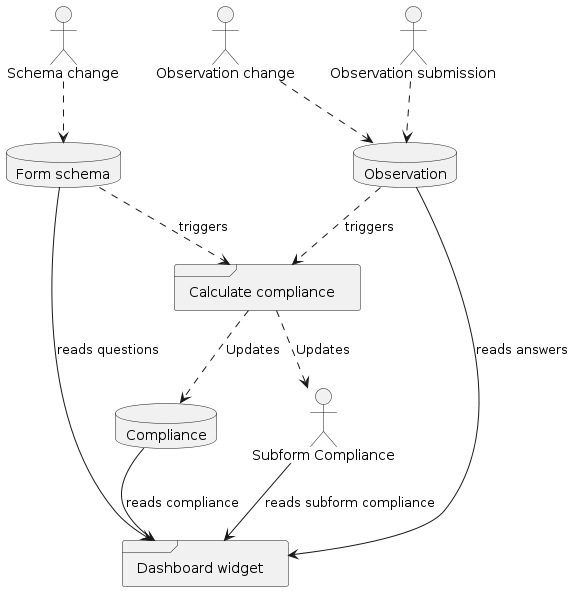
Example workflow showing how compliance calculation is triggered and its lifecycle up to being displayed by a dashboard widget. Dashed lines represent compliance calculation component, and solid lines represent reading data from database.
Note
Compliance updates are triggered asynchronously, so there can be a delay between observation update and compliance update.
Compliance weight
Weight is used to fairly calculate average compliance. For example, an observation that has more data can weigh more into overall average. Weight can be defined starting on question level and propagate all the way to observation, depending on form settings.
AuditFormConfig offer the following weighing options:
- question
questions are weighed to compute sub/observation compliance, but observations and sub-observations have equal weight (1.0). In forms with subforms, each sub-observation has equal weight, no matter how many questions were answered in that subform.
- sub-observation
sub-observations are weighed based on total weight of questions, but observations themselves are equally weighed.
This setting affects how compliance is distributed within forms with subforms. Subforms that have more answers (i.e. higher sum of answer weights) will weigh more into calculating average compliance within observation. This setting does not have an effect of forms without subforms.
Note
If a subform was added multiple times to an observation, each sub-observation is still calculated separately.
Caution
CustomSubform can have a weight that will override question weight.Note
Some audits with subforms, such as HIQA and IPC store each sub-observation in a separate observation. In this case “sub-observation” weight setting will have no effect.
- observation
observations are weighted based on total question/subform weights.
This setting affects how compliance for groups of observations is calculated (e.g. “Compliance Widget” in dashboard). If set, observations will no longer be calculated equally, but their weight will depend on total weight of questions / subforms within each observation.
Example
This example shows an observation with various sub-observations.
Note:
Subform2 has two instances (a and b)
Subform3 has a hardcoded weight (2.0)
Each question has the default weight (1.0) for simplicity
Un-answered questions do not count towards compliance weight
![folder Observation {
folder Subform1 [
**Subform1**
Answer 1
]
folder Subform2a [
**Subform2a**
Answer 1
Answer 2
==
many=True
]
folder Subform2b [
**Subform2b**
Answer 1
Answer 2
Answer 3
==
many=True
]
folder Subform3 [
**Subform3**
Answer 1
Answer 2
Answer 3
Answer 4
====
weight=2.0
]
}](../_images/plantuml-e5805e81f31d6c15f6fd8445ac8481e01e33b2e7.png)
Weight level |
Observation |
Subform1 |
Subform2a |
Subform2b |
Subform3 |
|---|---|---|---|---|---|
Question |
1.0 |
1.0 |
1.0 |
1.0 |
1.0 |
Sub-observation |
1.0 |
1.0 |
2.0 |
3.0 |
2.0 |
Observation |
8.0 |
1.0 |
2.0 |
3.0 |
2.0 |
Field Compliance calculation setting
The custom field’s compliance_calculation field has the following options:
- ignore
Field does not contribute to observation’s overall, compliance. Similar to if its weight was 0. It may still have compliance calculation logic.
- use
The field is used when calculating observation compliance
- require
The field is used to compute observation compliance, and if answer to this field is incompliant, it brings entire observation’s compliance down to 0% regardless of other answers.
Warning
compliance calculator stops calculating as soon as it encounters field with compliance less than 100% and calculation=require. This may affect observation’s weight if compliance weighting is set to “observation” as in this case the weight will be 1.0.
- answer_values
A dictionary mapping answer values to compliance scores. Given a choice field, you can apply different compliance values for each choice:
{
    "yes": 1.0,
    "no": 0.0,
    "maybe": 0.5
}
For number fields custom syntax is supported to allow usage of equality operators. The following operators are supported:
><>=<=:{ ">=1": 1.0, "<0": 0.0, ">=1<10": 1.0, "<-1": 0.0, ">=1.5<9.4": 1.0 }
The database storage of answer_values doesn’t guarantee the input order of the keys. For this reason answer value equality expressions will be processed in ascending order of the compliance value. So given the following answer_values
<-1will be checked first, because it has the lowest compliance. For keys with the same compliance the expressions could be processed in undefined order:{ ">=1<10": 1.0, "<-1": 0.0, "20": 1.0 }
Exact matches for answers are prioritized, so in the above example
20will be checked first:
Calculating compliance
ComplianceCalculator is responsible for calculating compliance from observation answers.
It re-computes compliance for each observation in the background after an observation is submitted, edited, or form compliance schema changes.
Retrieving Compliance Data
There are two primary ways to retrieve compliance data, depending on the granularity required:
Standard Reporting: Use the
ObservationCompliancemodel and its queryset methods for pre-computed, whole-observation compliance.Granular Calculation: Use the
ComplianceGetterclass for complex calculations, such as determining compliance for specific subsets of fields.
![@startuml
skinparam wrapWidth 200
skinparam style strictuml
skinparam ActivityBackgroundColor #FEFEFE
skinparam ActivityBorderColor #333333
skinparam ActivityDiamondBackgroundColor #FDFDFD
skinparam ActivityDiamondBorderColor #555555
skinparam NoteBackgroundColor #FEFFDD
skinparam NoteBorderColor #CCCC88
title **Compliance Calculation Comparison**
start
:Choose Compliance Type;
split
-[bold,#008000]-> **Whole Observation**
(Standard Reporting);
partition "Full Logic" {
:Input: All Compliance Fields;
:Apply **ALL** Weights
(Observation + Form + Subform);
:Apply 'Required' Rules
(Single failure = Total failure);
}
#DDEEDD:**Result: Accurate Total Compliance**;
split again
-[bold,#0000FF]-> **Field Subset / Widgets**
(Custom Calculation);
partition "Simplified Logic" {
:Input: Selected Fields Only;
:Apply **Field Weights Only**;
note right
**Ignores:**
* Observation/Form Weights
* 'Required' Rules
end note
}
#EEDDDD:**Result: Simple Average**;
end split
stop
@enduml](../_images/plantuml-7265a3ad4214fd491bdabaa88dac408b96e6c1a5.png)
Observation Compliance
The standard Observation Compliance represents the accurate, total compliance score for an observation, accounting for all configured compliance rules, weights, and logic.
Field Compliance (Single Field)
You can extract compliance data for a specific field. This results in the average compliance score of that field across all observations.
Calculation Logic:
Observation Weight is ignored: Every observation contributes equally to the average.
Field Weight is ignored: Because only one field is being calculated, relative field weights are not relevant.
Multiple Answers: If a field is answered multiple times within one observation (e.g., inside a subform), those answers are averaged first to create a single value for that observation.
Multi-field Compliance
Some dashboard widgets allow users to calculate compliance based on a specific subset of fields, rather than the entire observation.
Calculation Logic: Unlike single-field compliance, this calculation uses a weighted average based on the configured weight of the selected fields.
Field Weight: Compliances are weighted solely by the field’s weight. If a field has a weight of 0, it is effectively ignored.
Multiple Answers: As with single-field compliance, if a field is answered multiple times, the answers are averaged into a single value before the field weight is applied.
Important
Why calculations might differ
When calculating compliance for specific fields (Single or Multi-field), the system uses a simplified logic that ignores the following complex settings:
Form weighting settings
Subform weights
Number of subform instances
The
compliance_calculation=requiresetting (a single field failure will not force the whole result to 0).
Therefore: The average compliance of all fields will not necessarily equal the standard ObservationCompliance. Similarly, the average compliance of subform fields will not necessarily equal the pre-computed subobservation compliance.
Subform Compliance
Per-instance subform compliance is stored in SubformCompliance. Each row represents
one instance of a subform on a single observation, storing:
Compliance score: The overall compliance of that sub-observation instance.
Effective weight: Resolved from the subform’s hardcoded
compliance_weight(when present and weight propagation is enabled by the form’s Compliance weight setting) or the sum of answered field weights within the instance.Field compliance: Per-field compliance values for the instance.
When a subform is added multiple times to an observation (many=True), each instance is stored as a separate
row with its own weight. Instances with more answered questions have a higher weight, meaning they contribute
more to the weighted average.
AuditScoresWidget retrieves subform compliance directly from
SubformCompliance via SQL, using per-instance weights for accurate weighted averages:
SUM(compliance * weight) / NULLIF(SUM(weight), 0)
Note
The pre-averaged subform_compliance JSON field on
ObservationCompliance is retained for other consumers but is not used by
AuditScoresWidget.